




Copyright © 2026 NOVABEYOND LIMITED (company number 2833487). All rights reserved.
Address: UNIT 616 6/F KAM TEEM INDUSTRIAL BUILDING 135 CONNAUGHT ROAD WEST SAI WAN HONGKONG.
Introduction
Scaling campaigns on Meta often hits a wall when you rely on standard self-serve ad accounts. Low daily spend limits, sudden restrictions, and automated reviews can freeze your best creatives just as they start to perform. For growth teams and media buyers, these roadblocks mean lost revenue.
The solution is upgrading to a Facebook agency ad account. Unlike a standard account you open yourself, an agency ad account is a high-trust asset provisioned through an official Meta partner. It offers higher spend ceilings, greater stability, and direct escalation routes for policy issues.
If you are wondering how to create a facebook agency ad account, the process requires working with a certified partner rather than just clicking a button in your settings. This guide covers the exact requirements, the setup process, and how to manage your new account for long-term stability.
If you need a stable Meta advertising environment immediately, talk to Novabeyond about our Facebook agency ad account solutions.
Quick Answer
How to create a Facebook agency ad account? You cannot create a partner-tier agency ad account directly by yourself. You must apply through a certified Meta Business Partner. The process involves:
Preparation: Gather your valid business license, website URL, and ensure you have a verified Meta Business Manager.
Partner Pre-Review: An agency like Novabeyond reviews your assets for compliance.
Account Provisioning: The partner submits the request to Meta and pushes the approved ad account directly into your Business Manager.
Funding: You top up the account balance through the agency and begin running ads with higher trust and spend limits.
What is a Facebook Agency Ad Account?
Search demand often clusters around terms like facebook agency ad account, meta agency ad account, and agency ad account facebook. While the phrasing varies, advertisers are all looking for the same thing: a premium Meta advertising account that can spend cleanly at scale.
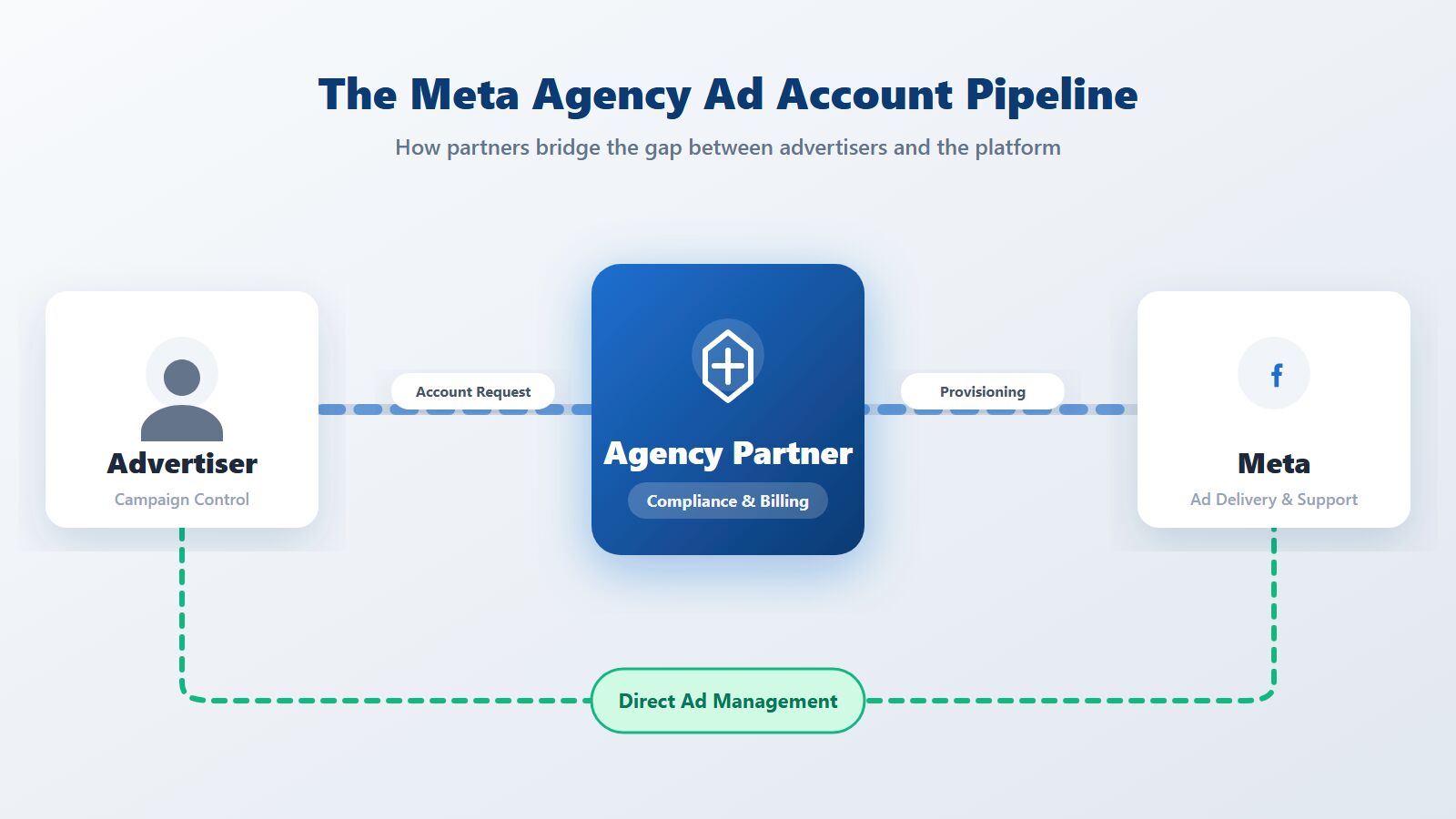
A Facebook agency ad account is a specialized advertising account issued exclusively through Meta Business Partners. For advertisers with ongoing advertising needs, choosing an agency can provide more professional assistance in account resources, financial management, and operational support.
When you use a facebook ad agency account, you still retain control over your campaign creation, targeting, and optimization. The agency simply handles the backend provisioning, compliance checks, and billing, acting as a bridge between your business and Meta's internal support teams.
Core Requirements to Get an Agency Ad Account
Before you ask a partner how to get facebook agency ad account access, you need to prepare your business assets. Meta requires partners to vet advertisers thoroughly to maintain the integrity of the agency ad account ecosystem.
Ensure you have the following ready:
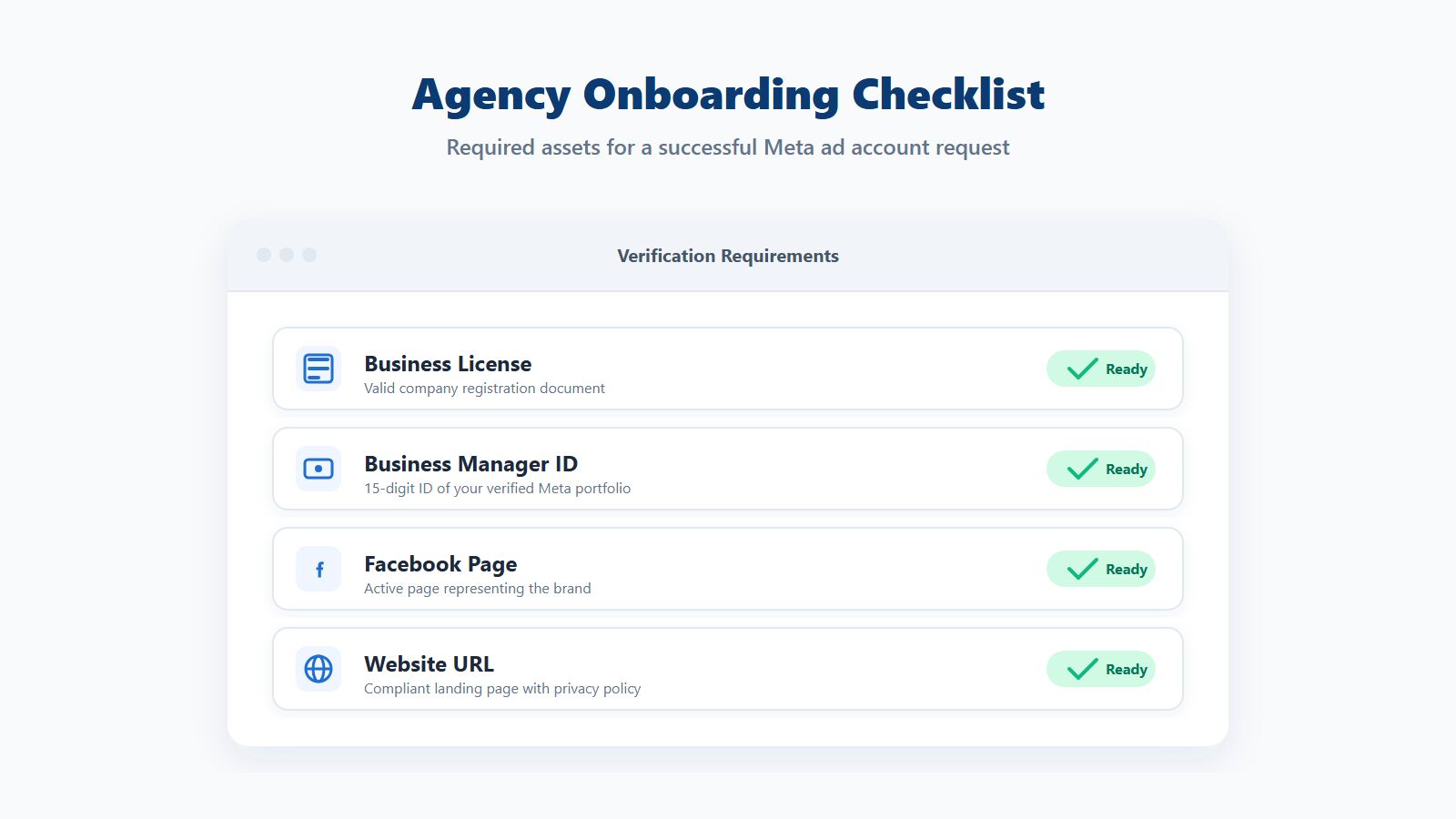
Valid Business License: You must provide a clear, active business registration document or company license. Meta uses this to verify that you are a legitimate corporate entity.
A Meta Business Manager: You need your own Business Manager (Business Portfolio) to receive the ad account. Ensure your Business Info is filled out accurately.
Compliant Website and Facebook Page: Your landing pages must function correctly, include a privacy policy, and adhere to Meta's advertising standards. Your Facebook Page should look active and professional.
Clean Advertising History: While agencies can help you navigate strict policies, a history of severe, repeated bans on your personal profile or existing accounts can complicate the approval process.
For a deeper look into why accounts fail during the review stage, read Novabeyond's guide on Facebook agency account mistakes and how to fix them.
Step-by-Step: How to Create a Facebook Agency Ad Account
Once your assets are prepared, the actual setup process shifts to your chosen agency partner. Here is how the onboarding workflow typically operates.
Step 1: Choose a Certified Meta Partner
Select an agency that offers transparent compliance checks and direct support. Avoid providers selling "unlimited" accounts with no vetting process, as these are often unauthorized workarounds that lead to permanent bans.
Step 2: Submit Your Document Pack
Provide your agency with your business license, your Business Manager ID, your Facebook Page link, and your primary website URL.
Step 3: Agency Pre-Review
A strong partner will conduct a "health check" on your creatives and landing pages before submitting anything to Meta. This preemptive review catches minor policy issues that could trigger an automated rejection, protecting your business's reputation.
Step 4: Accept the Account Invitation
Once Meta approves the request, the agency will provision the account. You will receive a notification in your Business Manager. Accept the invitation to link the new agency ad account to your portfolio.
Step 5: Top Up and Launch
Agency ad accounts typically operate on a prepaid model or a credit line managed by the agency. Once funded, you can assign your media buyers to the account and launch your campaigns.
Stop letting automated bans disrupt your revenue.
Contact Novabeyond today to secure your stable Meta agency ad account.
Regular Ad Account vs. Facebook Agency Ad Account
Understanding the difference between these two paths is crucial for your growth strategy.
| Feature | Self-Serve Ad Account | Facebook Agency Ad Account |
| Creation Method | You click "Create" in your Business Manager. | Provisioned by a certified Meta Business Partner. |
| Daily Spend Limits | Usually starts very low (e.g., $50/day) and takes weeks to increase. | Often starts with significantly higher spend caps. |
| Account Stability | Highly sensitive to automated restrictions and AI flags. | Higher trust score; less prone to sudden automated bans. |
| Support Access | Basic ticketing system; slow response times. | Assist the agent to appeal and communicate with Meta. |
| Best For | Small local businesses, testing new concepts. | Scaling brands, cross-border e-commerce, high-budget campaigns. |
If you are managing campaigns across multiple networks, you can explore our broader agency advertising accounts guide to see how this model applies to Google, TikTok, and other platforms.
Best Practices for Managing Your Agency Ad Account
Getting the account is only the first step. To maintain its health and maximize your ROI, follow these operational best practices.
Assign Roles Carefully
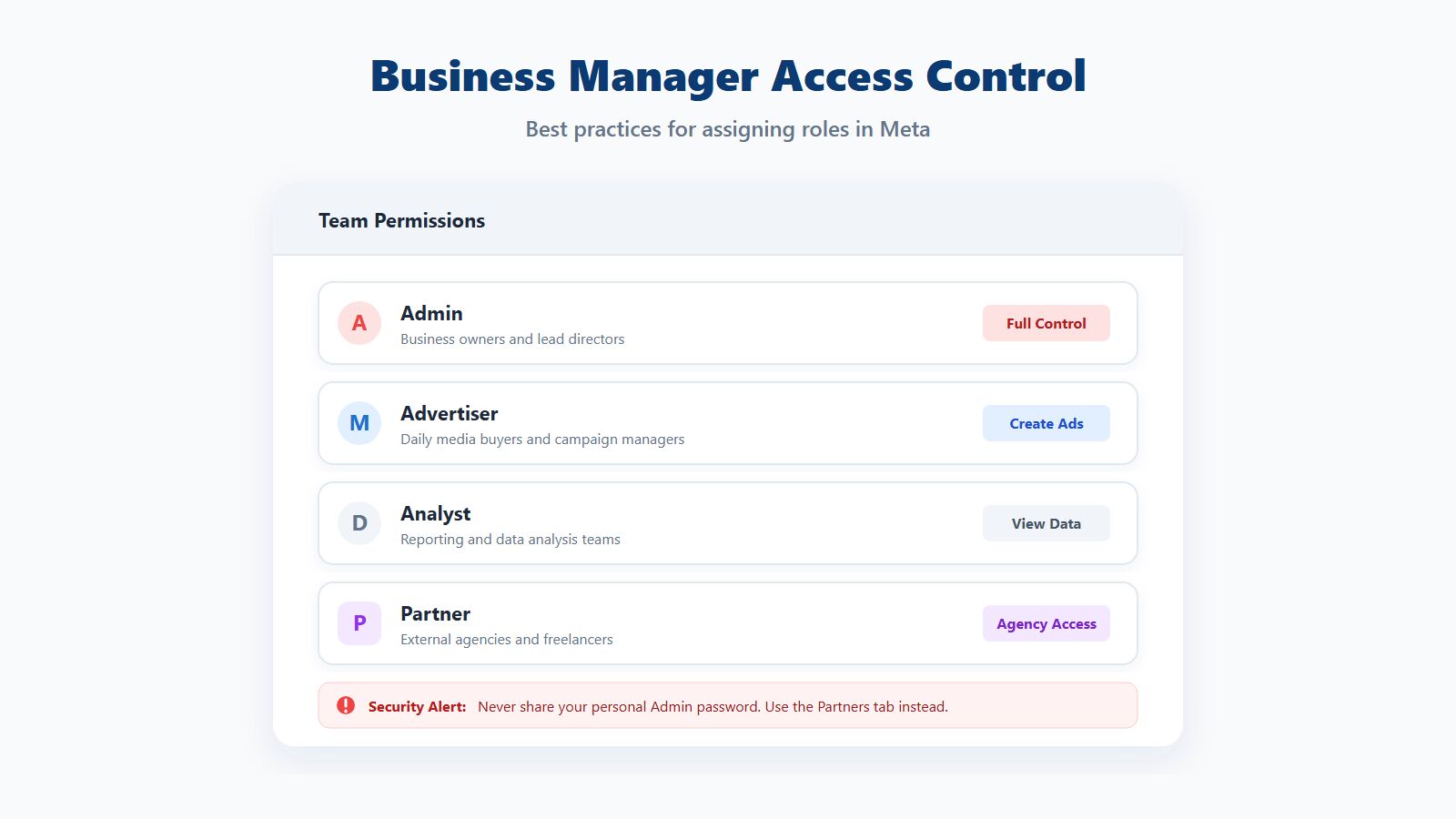
In your Business Manager, only give "Admin" access to business owners or lead directors. Assign your daily media buyers the "Advertiser" role. If you work with external freelancers, use the "Partners" tab to share assets rather than handing out passwords.
Implement the Meta Pixel and Conversions API
Account stability does not replace the need for accurate data. Ensure your Meta Pixel and Conversions API (CAPI) are correctly installed and linked to your new agency ad account. This allows Meta's algorithm to optimize for high-value events rather than just cheap clicks.
Warm Up the Account Safely
Even with a high-trust agency ad account facebook setup, avoid launching dozens of aggressive campaigns on day one. Start with a moderate budget and compliant creatives to build a healthy delivery history over the first week.
For more insights on adapting to platform changes, review our 2026 Meta Ad Logic Shift guide.
FAQ
1. What is a Facebook agency ad account?
A Facebook agency ad account is a premium advertising account provided by a certified Meta Business Partner. It offers higher spend limits, stronger stability against automated bans, and dedicated support compared to standard self-serve accounts.
2. How do I create a Facebook agency ad account myself?
You cannot create a true partner-tier agency ad account by yourself. You must apply through an official Meta partner who will vet your business and provision the account into your Business Manager.
3. How long does it take to get a meta agency ad account?
If your business documents (license, website, Page) are clean and compliant, a qualified agency can typically secure and provision your account within 1 to 3 business days.
4. What happens if my agency ad account gets restricted?
If a restriction occurs, you do not have to rely on standard support tickets. Your agency partner can communicate directly with Meta representatives to appeal the decision and resolve the issue much faster.
5. Do I own the ad account or does the agency?
The agency owns the billing and the top-level administrative rights to ensure compliance, but the account is linked to your Business Manager. You retain full control over campaign creation, audience data, and optimization.
6. How do I add an agency to my Facebook ad account?
If you want an agency to manage your existing self-serve account, go to your Business Manager Settings, select "Partners," click "Add," and enter the agency's Business ID to grant them Advertiser access.
7. Can I run ads for multiple clients in one agency ad account?
No. It is a strict Meta policy that each ad account should represent a single brand or client. Mixing different clients, domains, or business models in one account can trigger severe restrictions.
8. How does billing work for a Facebook agency ad account?
Instead of adding your credit card directly to Meta, you typically fund the account by prepaying the agency partner via bank transfer or other agreed methods. The agency then handles the platform billing.
Conclusion
Understanding how to create a facebook agency ad account is essential for any brand looking to scale without the constant fear of spend limits or automated bans. By shifting from a self-serve mindset to a partner-backed model, you unlock the stability required for serious growth.
Remember that the process relies on preparation. Get your business license ready, clean up your landing pages, and ensure your Business Manager is verified. Once you hand those assets to a qualified partner, you can focus on what actually matters: building winning creatives and driving ROI.
Ready to scale your campaigns with a stable, high-limit account?
Contact Novabeyond today to get your Facebook agency ad account.
more posts
Google Ads Suspended in 2026? How to Appeal and Unblock Your Manager Account
September. 20 2026
LEARN MORE

Swiftproxy Review 2026: Exploring Its Residential Proxy Features and Performance
July. 17 2026
LEARN MORE
Verified Agency Ad Account Provider | Stable Ad Accounts 2026
May. 25 2026
LEARN MORE
2026 Agency Advertising Account Leasing Service: A Guide
May. 20 2026
LEARN MORE