




UNIT 616 6/F KAM TEEM INDUSTRIAL BUILDING 135 CONNAUGHT ROAD WEST SAI WAN HONGKONG.
Copyright © 2026 NOVABEYOND LIMITED (company number 2833487). All rights reserved.
Introduction
A company can have a Kwai profile, a registered work email, and a finished advertising plan without having an account that can run ads. For a global team, the first task is identifying which of those pieces already exists and which still needs approval.
Kwai ad account setup starts with the correct business route, an identifiable advertiser, and requirements confirmed for the intended market. Register the responsible user, complete the requested business checks, and establish access to the advertising environment. A social profile or successful sign-up alone does not complete that process.
This guide helps advertisers choose the right entry point, prepare a market-specific application, and interpret their current setup status. The objective is fewer avoidable resubmissions and a clearer path from registration to a usable account.
Check the right Kwai setup route for your business and market with Novabeyond
Quick Answer
Start with Kwai for Business for an advertising inquiry, or the official advertising sign-up route supplied for your application. Keep three things distinct: the person signing in, the business being reviewed, and the advertising account they can access. Prepare company, product, destination, contact, and target-market information before submission. If you already registered, identify whether the remaining issue concerns credentials, advertiser review, or account availability instead of starting again. For international campaigns, confirm the supported market and product separately. Email registration is an access step, not proof that every country, ad format, or product category is available.
Choose the Right Kwai Registration Route
A Personal Kwai Account or an Advertising Login?
A personal Kwai account supports watching, publishing, and interacting with content. Advertising tools serve a different task: buying media for a business. Choose the route based on that task rather than assuming any page with the Kwai logo creates the account you need.
For ordinary app registration, use the sign-up options displayed in the official app. Kwai's personal-account recovery guidance distinguishes mobile-number access from third-party login, such as Facebook. Those recovery instructions do not establish how business advertising access works.
For paid campaigns, the Kwai for Business website introduces advertising products and provides a Contact Us route. The official advertising login displays Email and Password fields, Sign up, and password recovery. A business inquiry starts a conversation about advertising; creating login credentials serves a separate purpose.
Match the Entry Point to Your Task
Your immediate goal | Appropriate starting point | What to clarify next |
|---|---|---|
Create or recover a personal profile | Official Kwai app and account help | The registration method associated with that profile |
Ask how your business can advertise | Kwai for Business and its advertising contact instructions | Entity, product, target market, and available onboarding route |
Register an advertising user | The official advertising sign-up route confirmed for your application | Which email to register and what follows registration |
Return to an existing advertising account | The advertising login associated with your approved setup | Whether the expected advertiser account is available |
If a Kwai sign up page looks different from an older tutorial, check the domain and the product you opened before entering company information. Use the instructions supplied for your actual application rather than treating a screenshot from another market as a universal workflow.
Our Kwai Ads account creation guide provides a broader application sequence. Here, establish the correct route first so that an existing registration is not mistaken for a new application requirement.
![Choosing the correct Kwai sign up and advertising account entry point]](https://novabeyond.com/ueditor/php/upload/image/20261026/1793003367803630.jpg "Choosing the correct Kwai sign up and advertising account entry point]")
Kwai Sign Up with Email: Keep Identity and Access Connected
Use the Email Requested for Advertising Registration
For Kwai sign up with email, start from the official advertising page or the business registration route confirmed by your onboarding contact. Follow the fields and verification instructions displayed there. Keep access to that mailbox throughout the application and subsequent account use.
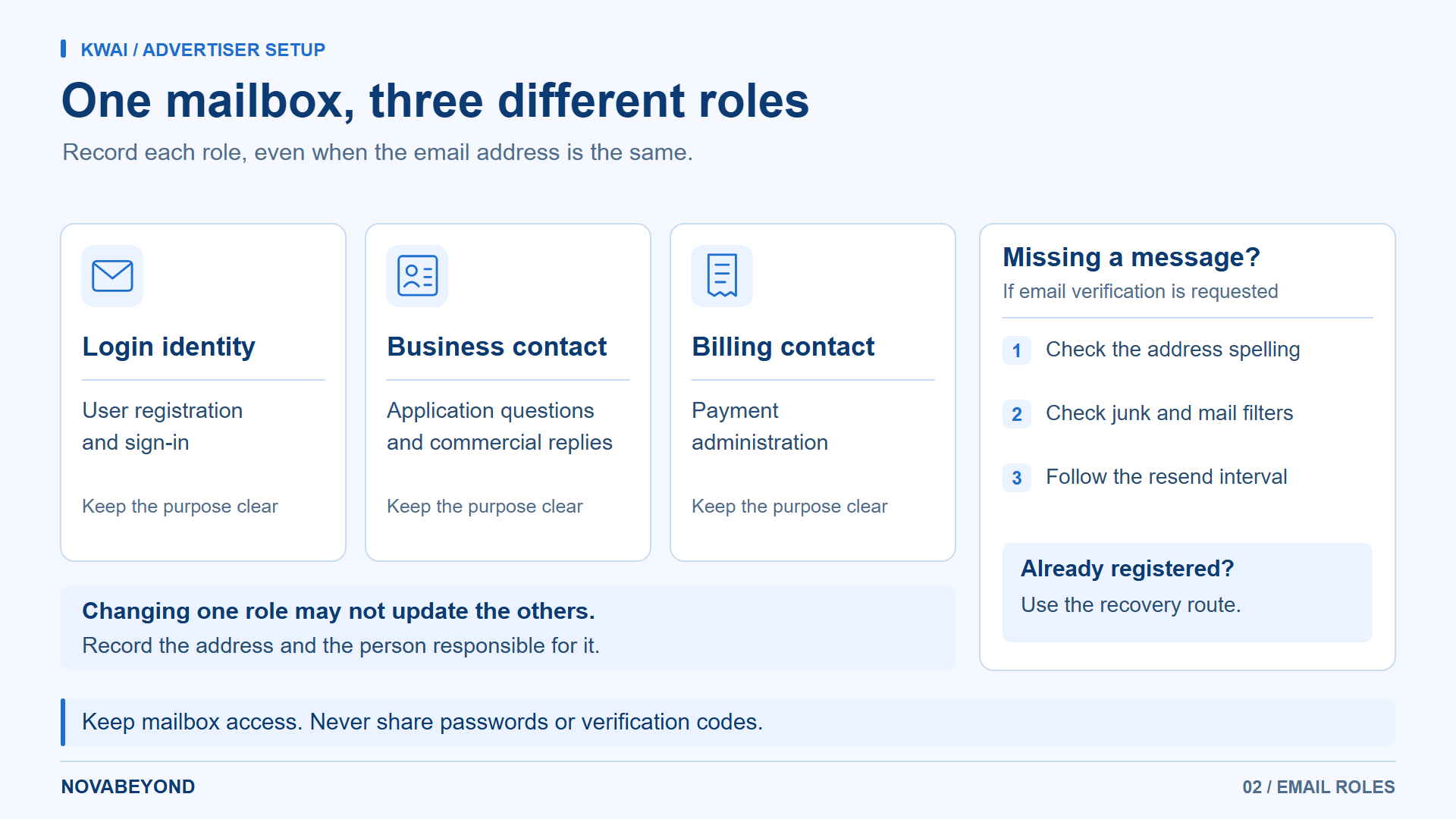
Treat these as three separate email roles:
Login identity: the address entered when the user registers and signs in.
Business contact: the address receiving application questions and commercial communication.
Billing contact: the address used by the relevant team for payment administration.
These may be the same address, but do not assume that changing one automatically changes the others. Record which email serves each purpose. A company-managed mailbox is useful for continuity; this is an operational recommendation, not a claim that every registration route requires a corporate domain.
Resolve a Missing Message at the Correct Stage
If the registration screen requests email verification and the message does not arrive, check the exact spelling, junk folder, and company mail filtering. Follow any resend interval displayed on the page. If your address is already registered, use the recovery option for that advertising login rather than creating another identity immediately.
For Kwai ads login problems, distinguish a rejected password from a page that accepts your credentials but cannot show the expected account. The first needs a credential check; the second needs the account and registered email checked together. Do not send passwords or verification codes to support contacts.
Kwai's advertising account terms require accurate contact information and protection of account credentials. Keep a short internal record of the registration address and its responsible user, without storing the password in the application checklist.
Prepare a Market-Specific Advertiser Record
Separate the Advertiser from the Destination Market
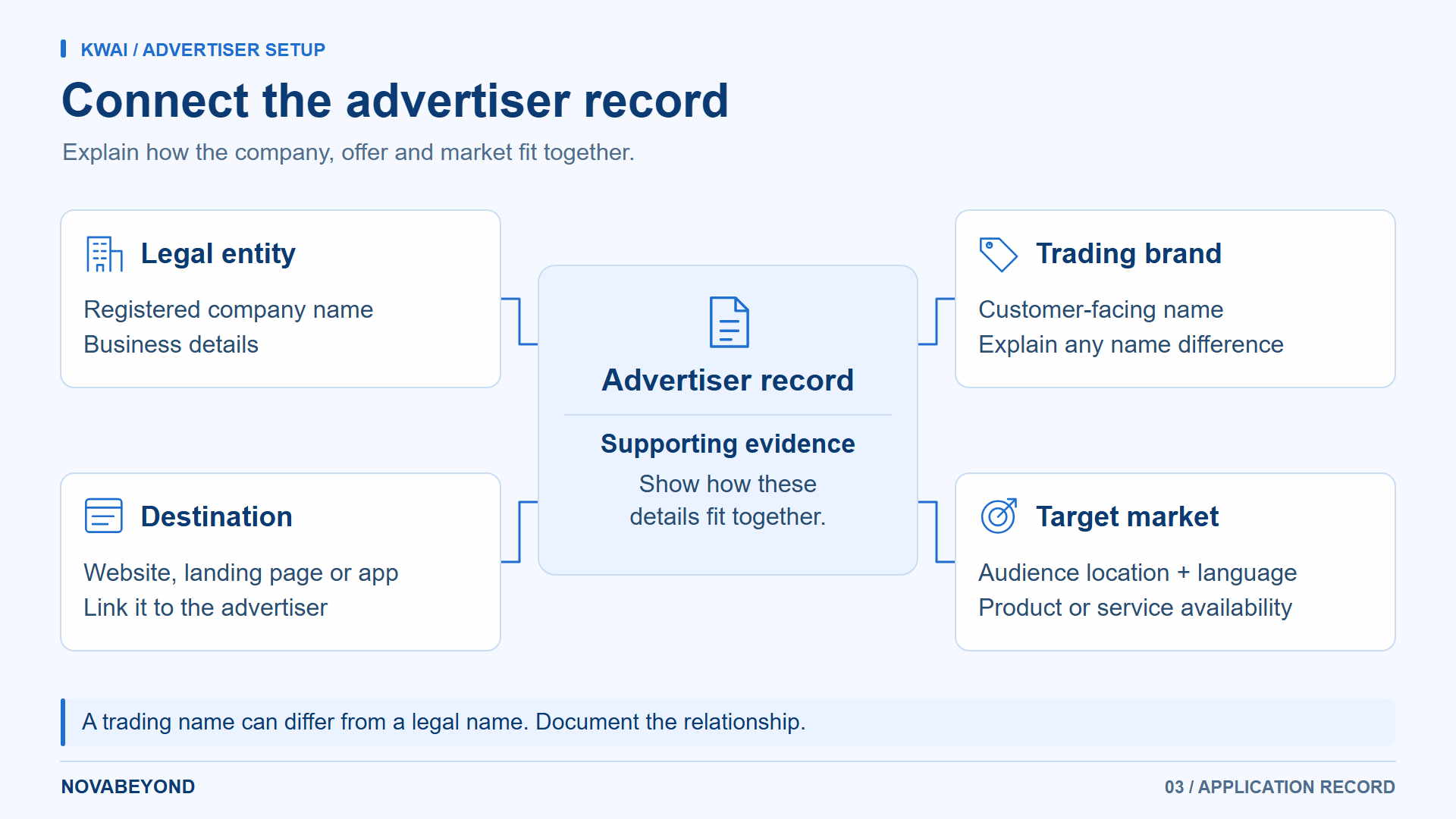
Global setup involves at least two different locations: where the advertiser is established and where the audience will see the campaign. A third location may be relevant when the product, website, or app is operated by another business. Describe those relationships accurately instead of copying the target country into every company field.
Kwai's official advertising application instructions request company information, a commercial license or certificate number, company website, size, target users, industry, advertising expectations, budget, and decision-maker details. The page also provides a commercial contact email and the business site's Contact Us option.
That guidance uses CNPJ and Brazilian reais. Treat those as Brazil-specific references, not instructions for every international applicant to obtain a Brazilian registration number. Ask which documentation applies to your legal entity and proposed market. For a Brazil-focused application, consult the Kwai Brazil account setup guide alongside the requirements confirmed for your case.
Build One Consistent Application Record
Prepare the following as an internal working record, then supply the information actually requested through the approved application route:
Advertiser identity: legal name, registration details, address, and designated contact.
Offer: brand or product name, category, and a plain-language explanation of what users receive.
Destination: the intended website, landing page, or app listing and its relationship to the advertiser.
Market: proposed audience location, language, and product availability.
Commercial context: planned campaign objective, budget, and the billing information requested.
Outstanding questions: any entity, category, authorization, or market requirement still awaiting confirmation.
Kwai's registration-information terms explicitly require company, contact, address, payment, and relevant tax information to remain accurate and current. For product evidence, avoid submitting a generic corporate homepage when the reviewer needs to understand a specific service or app.
For example, a retailer might use its legal company name on the registration document and a different trading name on its store. The useful preparation is an explanation of that relationship and any supporting evidence requested, not renaming the advertiser to match the store without checking the legal details.
Check the Offer as a Local Customer Would
Open the submitted destination in the language intended for the campaign. Can the customer understand the offer, identify the seller, and complete the promised action? Confirm that shipping, service availability, or app distribution actually supports the proposed market.
Kwai's advertising policy on destinations and relevance requires functional landing pages and consistency between the advertised product and the destination. Correct a broken page or mismatched offer before submission. This preparation also reduces the chance of paying for clicks that cannot become the intended business result.
Have Novabeyond review your advertiser information and target-market fit
Find Your Next Action by Account Status
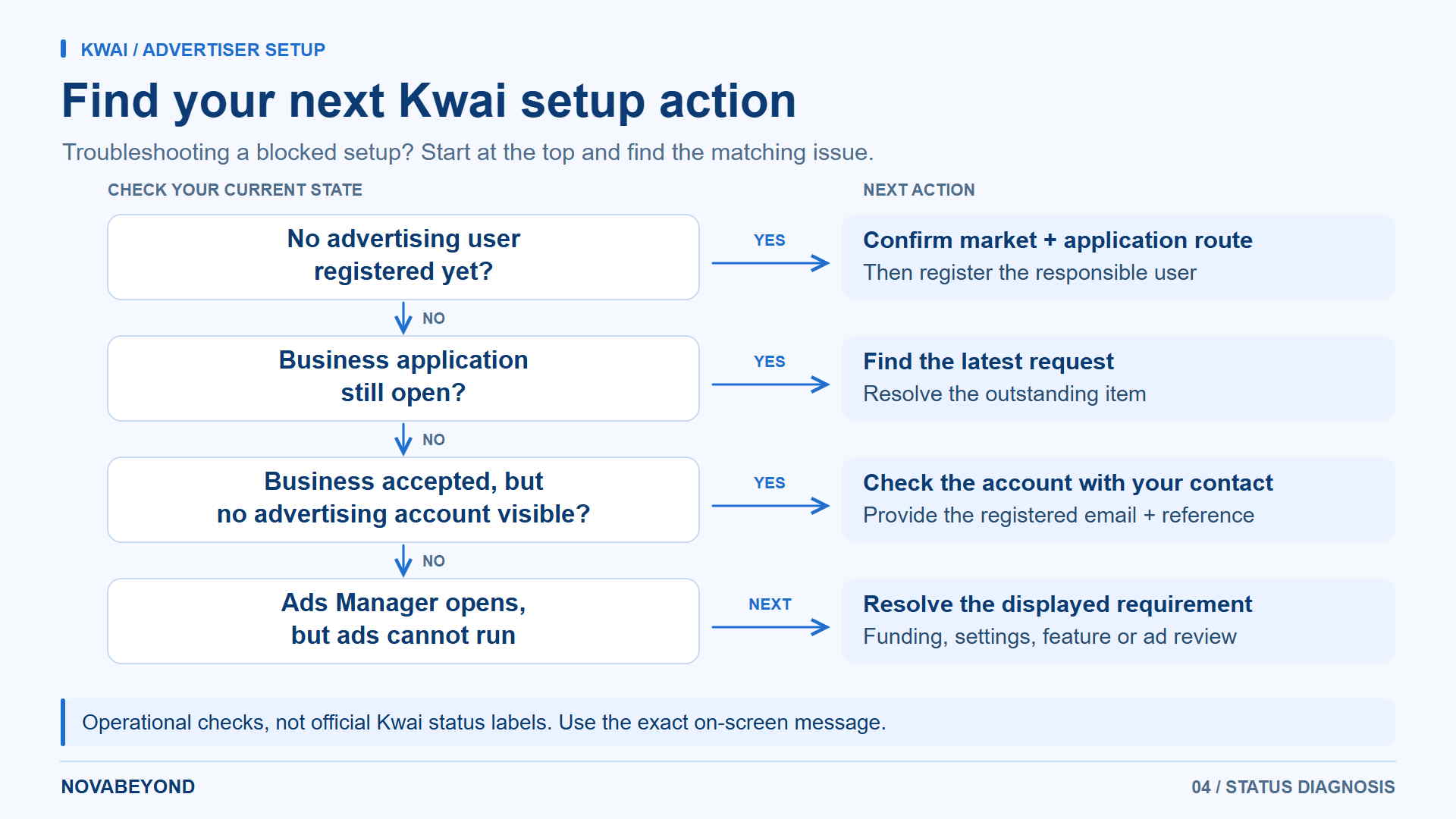
Use the descriptions below to diagnose your stage. They are a working checklist, not a reproduction of Kwai's official status labels.
You Have Not Registered an Advertising User
Confirm your intended market and application route before creating credentials. Prepare the responsible email and company record. If you only have an app profile, return to the business route rather than changing the social profile in the hope of activating advertising.
You Registered, but the Business Application Is Still Open
Find the latest request or acknowledgment and identify what remains unanswered. It might concern a document, company details, or the advertised destination. Keep one corrected record and ask for confirmation of the current review stage.
The official public guidance does not provide one completion time for every application. Plan around the remaining task and the estimate supplied for your case, rather than a general promise of approval in one to three days.
Your Business Was Accepted, but No Advertising Account Appears
Provide the administrator or onboarding contact with the registered email, advertiser name, any supplied reference, and the exact on-screen message. Ask whether the intended account is available to that user. A blank account list alone does not identify whether the issue is incomplete setup or access configuration.
For Kwai business login or Kwai Business Center questions, include the URL you used. An error at one entry point is not enough to conclude that every account associated with the business is unusable.
You Can Open Kwai Ads Manager, but Cannot Advertise Yet
Identify the specific remaining requirement shown in the account: funding, a campaign setting, an unavailable feature, or ad review. Investigate that requirement rather than repeating registration.
Account acceptance and permission to show an individual ad are separate. Kwai's ad review policy covers the creative, text, targeting, positioning, and destination. If an ad is rejected, use the stated reason to correct that ad; reopening the company application is not a substitute.
Make the First Target Market Operationally Ready
Confirm the Media Product, Not Just the Country Name
Kwai's public advertising product overview includes several ad formats and examples involving SnackVideo. A reference to a country on a public page does not establish that every product is selectable in your account. Confirm the combination of target market, media product, objective, and available ad format before commissioning creative.
Record the market, media product, available format, and destination together. For an app, check distribution in that market; for a store, check that the proposed audience can actually order. Resolve missing availability or a conflicting requirement before treating the account as ready for that market.
Use Agency Help for a Defined Gap
A Kwai agency can help coordinate the market questions or application requirements your team cannot resolve internally. Specify the missing work: checking advertiser information, clarifying the route, or preparing the account for the intended market.
If you choose an agency ad account arrangement, use our Kwai agency onboarding and handover guide for partner responsibilities and access agreements. This keeps the advertiser's setup decisions separate from the detailed agency operating model.
Novabeyond's Emerging Media Solutions support market entry through onboarding, localized policy guidance, and campaign preparation. Bring the business record and the current setup issue so the discussion can start with the next required action.
FAQ
1. Where Is the Kwai Register Option for Advertisers?
The official advertising login displays a Sign up option. Use the route confirmed for your business application. If you need to establish whether your company can advertise in a particular market, start with Kwai for Business and its advertising contact instructions instead of registering unrelated app profiles.
2. Can the Same Email Be Used for Registration and Business Contact?
Use the addresses requested by the applicable form and onboarding instructions. One mailbox may serve both purposes, but record the login identity separately from commercial and billing contacts. If you need to change it, ask how the change affects the existing registration and account access.
3. Does Every International Advertiser Need a CNPJ?
CNPJ appears in Kwai's Brazil-oriented advertising instructions. It is not evidence of a universal requirement for advertisers established elsewhere. Confirm the accepted registration documents for your entity and the requirements of the market you intend to target.
4. Can One Approved Account Advertise in Every Country?
Do not infer worldwide eligibility from account approval. Check the destinations and products enabled for the account, the proposed category, and applicable local requirements. Adding another country should trigger a fresh market check, not an assumption that the original approval covers everything.
5. Is Business Verification the Same as Creator Verification?
No. The purpose of advertiser review is different from personal-profile verification or creator earning eligibility. Kwai creator program and monetization requirements concern another workflow. Neither a verified profile nor eligibility to earn from content establishes that a business can buy advertising.
6. What Should I Report If I See an Account Status Error?
Record the exact message, URL, approximate time, registered email, and business or account reference if available. Explain whether you were registering, signing in, or opening a campaign. Share relevant screenshots through official support channels, excluding passwords, codes, and unrelated personal information.
7. Can I Start the Business Inquiry Before My Campaign Assets Are Finished?
The official advertising inquiry instructions ask for company details and advertising plans. You can use that inquiry to clarify preparation requirements, but it does not replace the materials needed for the applicable review. Share a realistic destination and product description, and confirm what must be ready before submission or launch.
Conclusion
A useful Kwai ad account setup connects the right entry point with a clearly identified business and a specific target market. Keep email registration, advertiser review, and account availability separate so that the next action follows the actual issue.
Prepare consistent company and destination information, resolve market questions before committing production resources, and check what the account can actually do. Novabeyond helps global advertisers turn those decisions into practical emerging-media preparation without losing sight of the market they intend to serve.
Map your next Kwai registration and market-readiness steps with Novabeyond
more posts
TikTok Ads Rejected? 7 Common Policy Violations and How to Fix Them
November. 05 2026
LEARN MORE

Google Ads Suspended in 2026? How to Appeal and Unblock Your Manager Account
September. 20 2026
LEARN MORE
Swiftproxy Review 2026: Exploring Its Residential Proxy Features and Performance
July. 17 2026
LEARN MORE
Verified Agency Ad Account Provider | Stable Ad Accounts 2026
May. 25 2026
LEARN MORE