




UNIT 616 6/F KAM TEEM INDUSTRIAL BUILDING 135 CONNAUGHT ROAD WEST SAI WAN HONGKONG.
Copyright © 2026 NOVABEYOND LIMITED (company number 2833487). All rights reserved.
Introduction
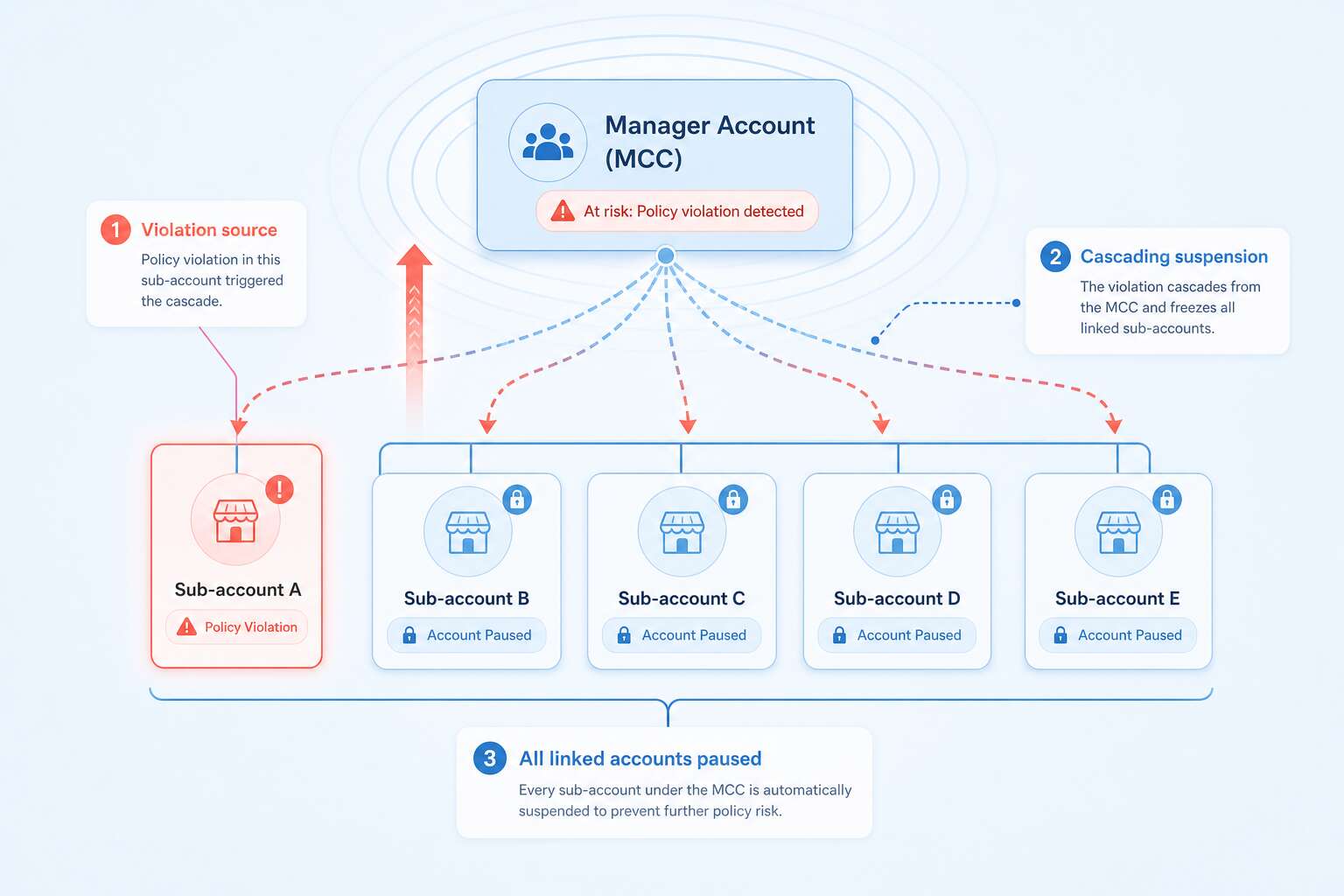
A Google Ads suspension is no longer just a warning, it is an immediate halt to your acquisition pipeline. In 2026, Google’s automated enforcement systems are faster and more aggressive than ever before, frequently flagging accounts for trust, billing, and policy issues before a human reviewer ever looks at the data. For agencies, enterprise brands, and performance marketers, the stakes are exceptionally high: a suspension at the Manager Account (MCC) level cascades downward, freezing every linked sub-account and paralyzing your entire advertising operation across all clients and product lines.
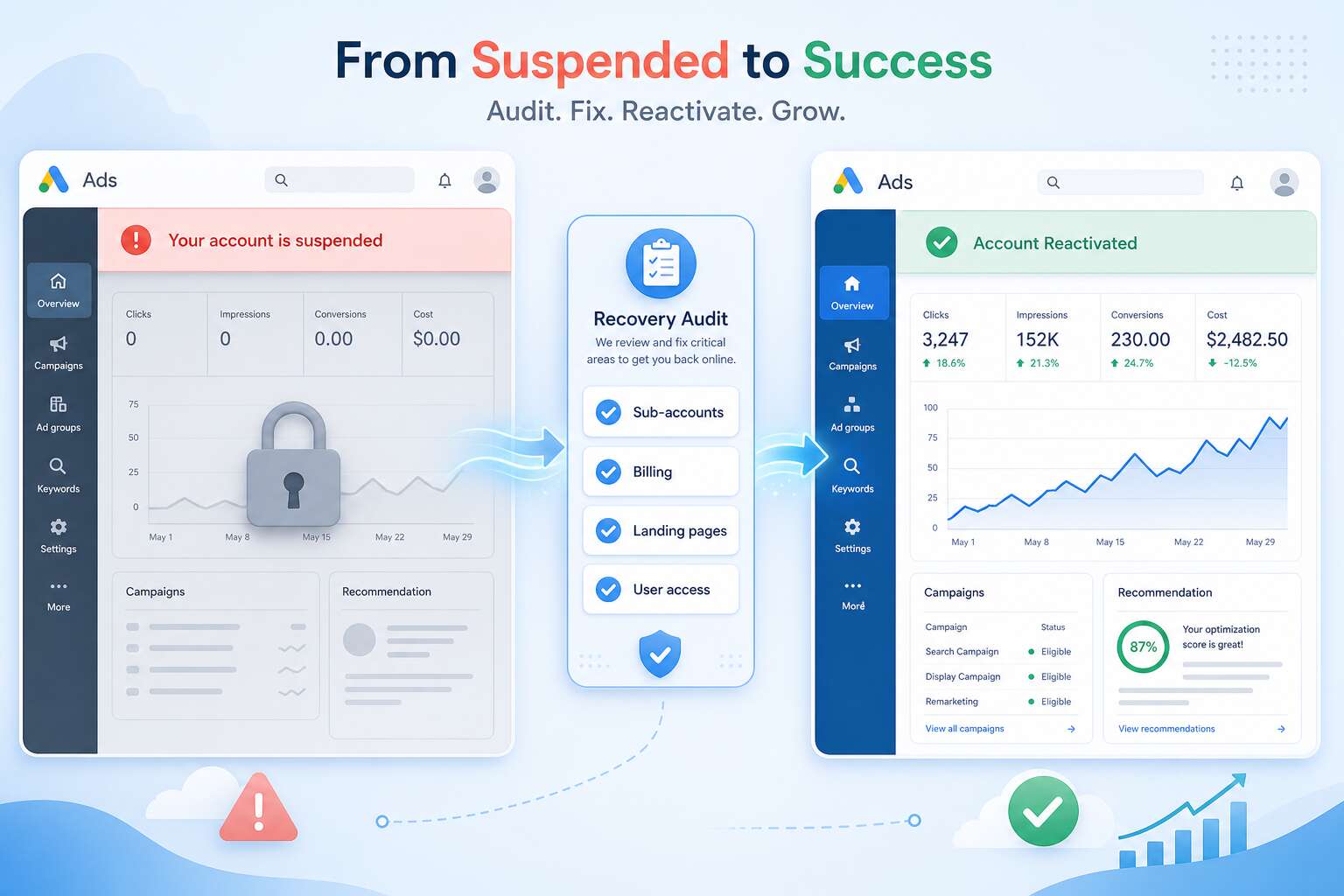
When that dreaded red banner appears at the top of your dashboard, the natural reaction for most media buyers and affiliates is to panic and submit an immediate appeal. This is the fastest way to turn a temporary hold into a permanent ban. Recovering a suspended Google Ads account requires a systematic, forensic audit of your entire advertising ecosystem. You must look beyond the ad copy and examine landing page redirects, billing profiles, historical user access, and the compliance status of every linked asset.
However, while this guide will show you exactly how to navigate the complex appeal process, smart advertisers know that prevention is better than recovery. That is why high-volume media buyers are moving away from fragile self-serve MCCs and migrating to premium Google Ads agency ad accounts to secure their growth. In this comprehensive guide, we will break down the most common reasons Google Ads Manager Accounts are suspended in 2026, how to submit a successful appeal, and why upgrading your account infrastructure is the ultimate solution to scaling without fear.
Quick Answer
If your Google Ads Manager Account is suspended in 2026, do not submit an immediate appeal. First, audit all linked sub-accounts, domains, billing profiles, and user access logs to identify the exact policy violation (e.g., Circumventing Systems or Suspicious Payment Activity). Fix the root cause across the entire account cluster. Once compliant, submit a single, fact-based appeal through the official Google Ads Policy Appeal Form. To prevent future downtime and bypass the fragility of standard accounts, the most effective long-term strategy is migrating your campaigns to a verified Google Ads agency ad account, which offers higher trust scores, isolated risk, and priority support.
Talk to Novabeyond about Google Ads Agency Ad Account
Why Google Ads Suspends Manager Accounts (MCC) in 2026
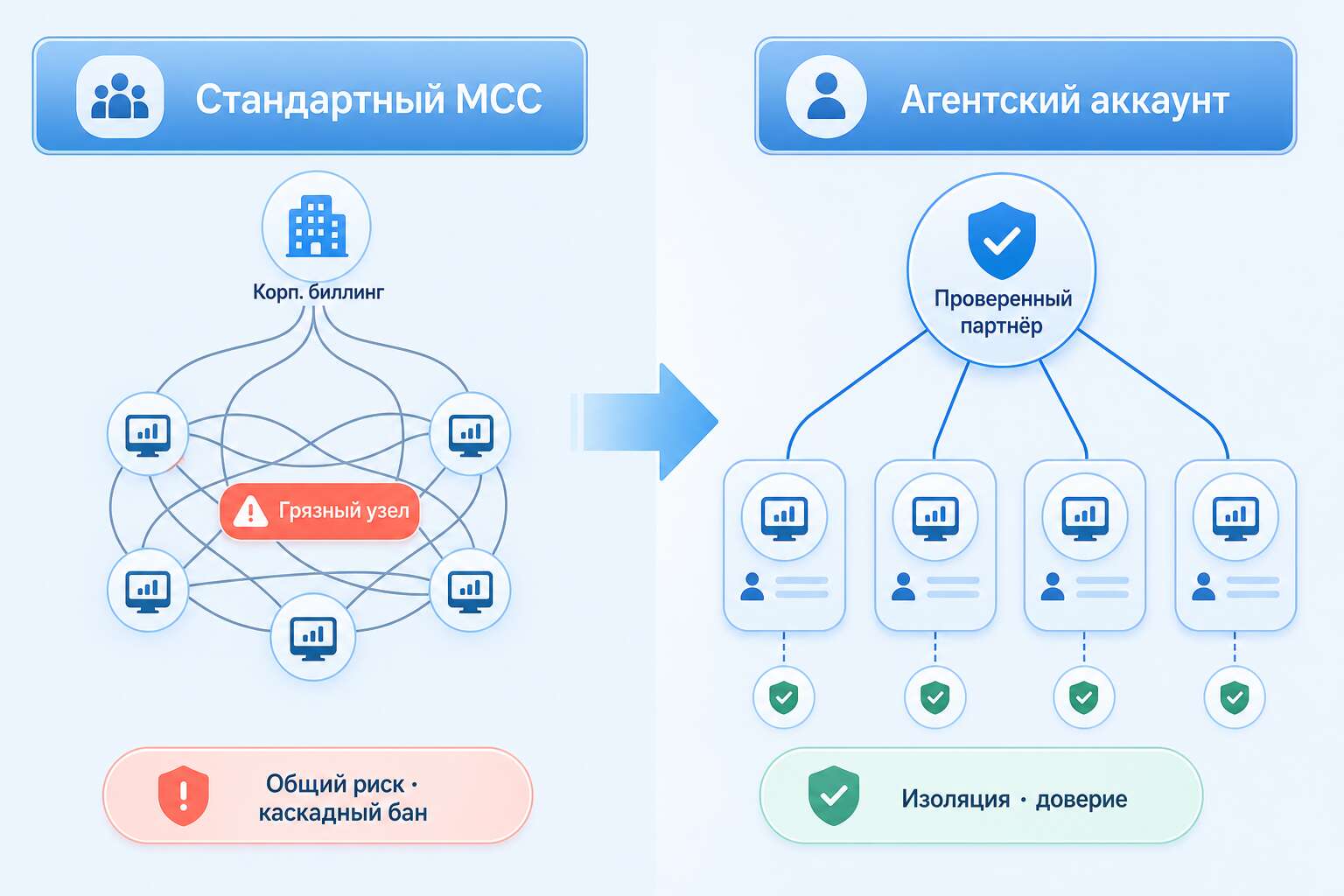
A standard Manager Account (MCC) is designed to consolidate billing, access, and campaign management across multiple client or brand accounts. It is the traditional backbone of agency operations. However, this centralized structure also centralizes risk.
If Google detects severe policy violations in one sub-account, the enforcement algorithm may flag the parent MCC. Once the MCC is suspended, all linked accounts, even those running perfectly compliant campaigns with pristine histories, are immediately paused. This cascading effect is designed to contain threats, but it often catches legitimate advertisers in the crossfire.
In 2026, Google significantly tightened its enforcement around user safety, data privacy, and advertiser transparency. The platform would rather suspend a legitimate advertiser by mistake than allow a harmful advertiser to continue spending. Understanding the specific policy violation is the first step toward recovery, and the first step toward realizing why a standard MCC may no longer be sufficient for your business.
The 5 Most Common Policy Violations (And How to Fix Them)
When your account is suspended, Google will usually provide a high-level policy label. These labels are often vague, requiring you to dig into the technical and operational realities of your account setup. Here are the top five violations driving suspensions in 2026.
Circumventing Systems
This is the most common and severe violation in 2026. Google flags accounts for "Circumventing Systems" when it detects attempts to bypass its review processes or deceive its automated crawlers. Because it is classified as an egregious violation, it often results in an immediate suspension without prior warning.
Common triggers include:
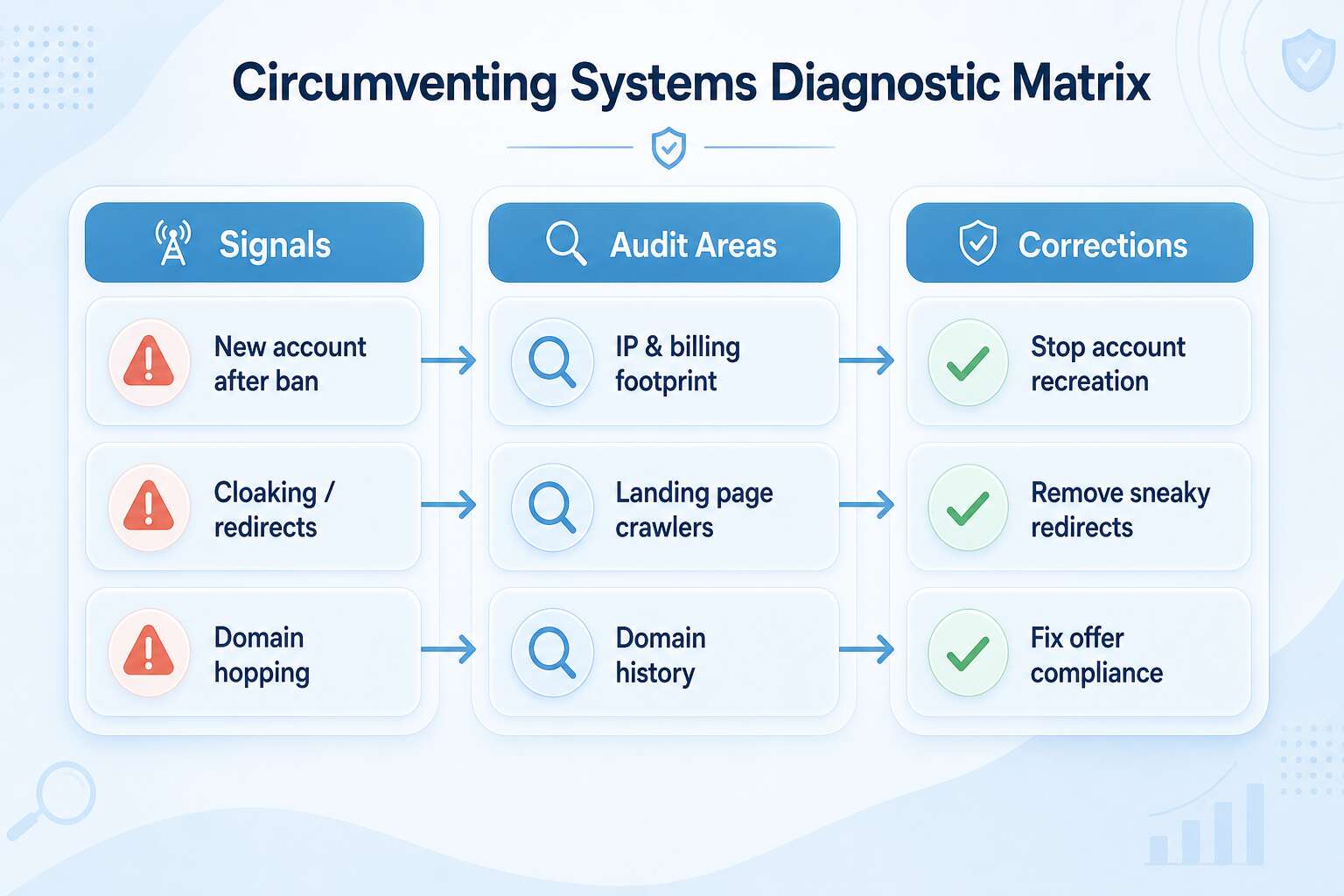
Creating new accounts to evade a ban: Opening a fresh ad account after a previous one was suspended is the fastest way to trigger this flag. Google tracks IP addresses, billing details, and domain footprints.
Cloaking and sneaky redirects: Showing Google's crawlers a compliant landing page while redirecting real users to a non-compliant offer or affiliate link.
Domain hopping: Repeatedly moving disapproved offers to new domains instead of fixing the underlying compliance issue.
Unacceptable Business Practices and Misrepresentation
Google strictly enforces user trust. Suspensions in this category occur when a website obscures its true identity, makes deceptive claims, or fails to provide a transparent user experience.
Common triggers include:
Missing business details: Lack of a clear physical address, contact information, privacy policy, or transparent refund policies on the landing page.
False claims: Promising unrealistic results without verifiable, scientific proof.
Phishing or scam patterns: Landing pages that mimic official brands, use fake urgency timers, or employ deceptive design patterns to harvest user data.
Suspicious Payment Activity
Finance hygiene is a critical component of ad compliance. Google will suspend standard accounts if the billing profile looks risky, even if the ad copy and landing pages are perfectly compliant.
Common triggers include:
Name mismatches: The name on the credit card does not match the legal entity verified in the account.
Virtual cards and prepaid bins: Heavy reliance on unverified virtual credit cards, which are often associated with churn-and-burn affiliate tactics.
Unpaid balances or chargebacks: A history of failed payments or sudden massive spikes in spend on a new account.
Note: This is exactly why high-volume media buyers prefer a Google Ads agency ad account, which utilizes stable corporate invoicing and credit lines, completely bypassing algorithm-triggering credit card flags.
Compromised Sites and Malicious Software
If a linked landing page is hacked, injects malicious scripts, or runs outdated, vulnerable plugins, Google will suspend the account to protect users. This is especially common on poorly maintained CMS platforms like WordPress.
Common triggers include:
Malware injection: Hidden scripts that redirect mobile users to spam sites.
Unwanted software: Forcing users to download files to access content.
Phishing links: Compromised outbound links hidden in the site's footer or comments section.
Linked Account Contamination
This is the issue many businesses miss. Your Google Merchant Center account, local business profiles, or other related Google Ads accounts can affect how Google sees your setup. If you run multiple ventures or share billing profiles across different businesses on a standard MCC, one "dirty" node can poison the entire cluster.
| Violation Label | Primary Triggers | Required Fix Before Appeal |
| Circumventing Systems | Cloaking, domain hopping, evading bans | Remove all redirects, consolidate domains, do not open new accounts. |
| Misrepresentation | Missing contact info, false claims, fake urgency | Add clear business details, privacy policies, and remove unrealistic claims. |
| Suspicious Payments | Card name mismatch, virtual cards, unpaid balances | Align billing name with legal entity, clear all unpaid balances. |
| Compromised Site | Malware, hacked plugins, malicious scripts | Run a deep security scan, update CMS, remove infected code. |
| Linked Contamination | Suspended Merchant Center, banned sub-accounts | Resolve the suspension on the original offending account first. |
Talk to Novabeyond about Google Ads Agency Ad Account
The Pre-Appeal Audit: Cleaning Your Advertising Ecosystem
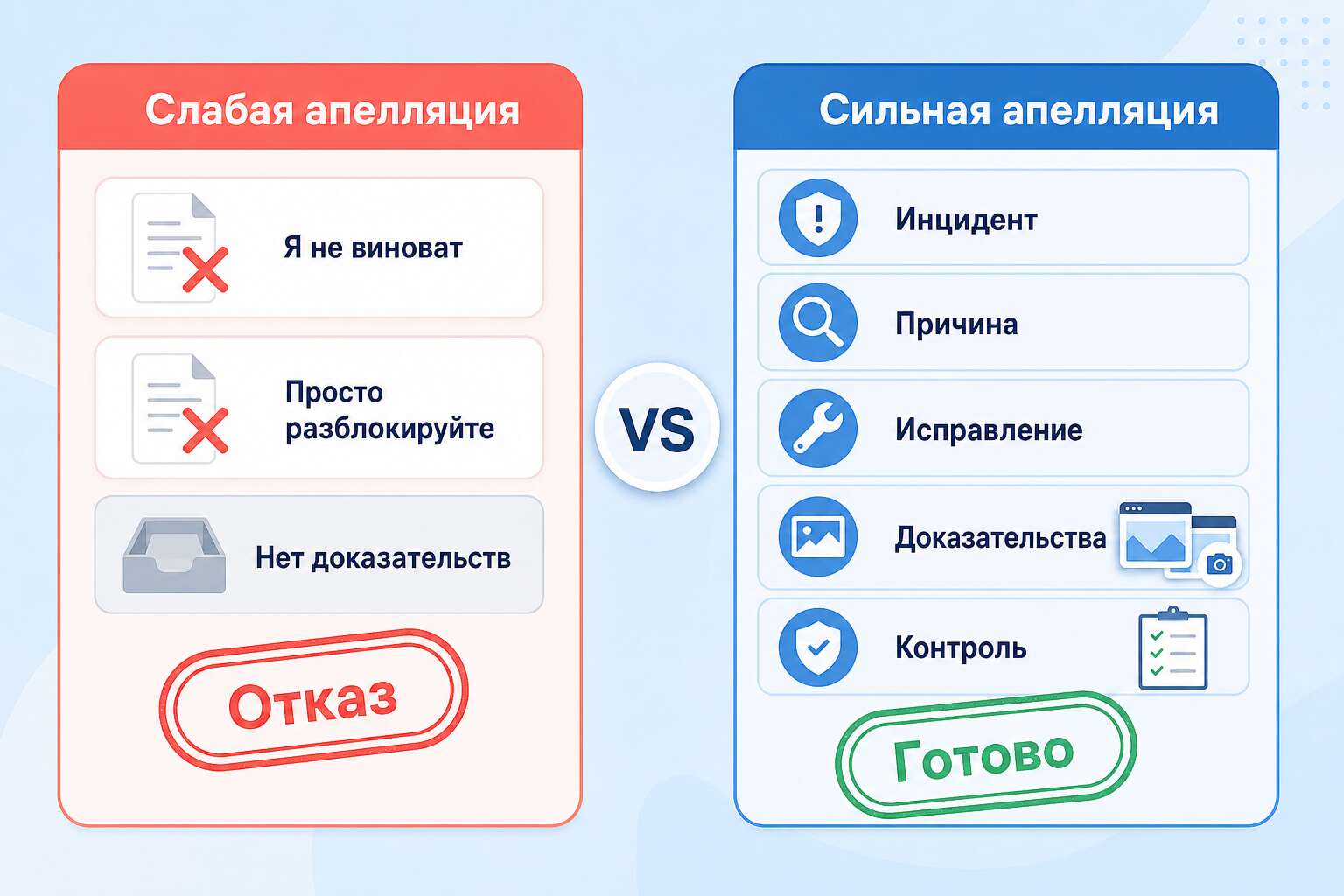
Submitting an appeal that simply says, "I didn't do anything wrong, please fix this," will result in an automated rejection. You must prove that you have identified the issue, taken corrective action, and implemented controls to prevent it from happening again. Before you even open the appeal form, you must conduct a rigorous pre-appeal audit.
Step 1: Map the Account Ecosystem
Review every Google Ads customer ID linked to your MCC. Check the status of each sub-account. If one specific client account triggered the suspension, you must address that client's violation first. Do not attempt to unlink the bad account and hide it; Google's systems track historical links and access logs.
Step 2: Verify Business Identity and Billing
Ensure that your legal entity name, billing address, and website footer information are perfectly aligned. Complete the Google Advertiser Verification process if it is pending. A verified business profile significantly increases trust during the manual review process. Check all payment methods to ensure there are no failed charges or mismatched names.
Step 3: Audit Landing Pages and Redirects
Test every active final URL across desktop and mobile devices. Remove broken links, clear out old redirect chains, and ensure your privacy policy and terms of service are visible and compliant with local data regulations (such as GDPR or CCPA). If you are using third-party click trackers, ensure they are not inadvertently cloaking the final destination.
Step 4: Clean Up User Access
Audit the users who have access to your MCC and sub-accounts. Remove former employees, old agency partners, or unrecognized email addresses. If a user with access to your account has a history of policy violations on other unrelated accounts, their "bad trust score" can negatively impact your MCC.
How to Submit a Successful Google Ads Appeal
Once you have cleaned your account infrastructure and documented your fixes, you are ready to submit the appeal. The appeal process is your one opportunity to present a clear, factual case to Google's review team.
Sign in to the suspended account: Use an administrator login for the exact Google Ads account (or MCC) that was suspended.
Open the suspension notification: Click the "Contact us" link in the red notification banner at the top of the account. This is the only Google-blessed appeal channel. Generic Google Ads support tickets are routed away from policy review.
Provide accurate information: Fill out the Google Ads Policy Appeal Form with your Customer ID, legal business name, and a concise description of your business model.
Structuring Your Appeal Narrative
A strong appeal reads like a compliance report, not an emotional plea. Google does not owe you a detective service; your appeal needs to do the heavy lifting. Structure your submission using the following framework:
The Incident: Acknowledge the specific policy violation cited by Google (e.g., "We received a Circumventing Systems suspension notice on [Date]").
The Root Cause: Explain honestly what triggered the flag. If you found a legacy redirect or a mismatched billing profile, state it clearly.
The Correction: List the exact changes made. Be specific. (e.g., "We removed the third-party redirect script, updated the final URL to match the display URL, and aligned our billing profile with our verified corporate entity").
The Evidence: Attach supporting documentation. This can include business registration certificates, tax IDs, screenshots of corrected landing pages, or malware scan reports.
The Preventive Control: Explain what processes you have put in place to ensure this does not happen again.
The Ultimate Solution: Upgrading to a Google Ads Agency Ad Account
While knowing how to appeal a suspension is necessary, the reality is that the appeal process is slow, frustrating, and incredibly costly in terms of lost revenue. Every day your campaigns are paused is a day your competitors are capturing your market share.
For agencies, enterprise brands, and high-volume media buyers, relying on a standard self-serve MCC is a massive operational liability. The smartest way to scale without the constant fear of sudden algorithmic bans is to migrate your advertising infrastructure to a premium Google Ads agency ad account.
Partnering with a verified provider like Novabeyond to secure an agency ad account transforms your risk profile and operational stability. Here is why top-tier advertisers make the switch:
Inherited Trust and Whitelisted Status
Standard accounts start with zero trust and are heavily scrutinized by Google's automated bots. A Google Ads agency ad account is provisioned through a verified, top-tier partner. This means your account inherits the strong, established trust score of the agency from day one. You are far less likely to be hit with false-positive suspensions for routine campaign changes.
Structural Risk Isolation
In a standard MCC, a single client's mistake can trigger a cascading ban that takes down your entire portfolio. When you utilize stable ad accounts provided by an agency, your assets are structurally isolated. If one specific account faces a policy flag, the isolation protects your broader portfolio from cross-contamination, ensuring your other campaigns continue running smoothly.
Priority Support and Faster Appeals
If a false positive does occur, you do not have to wait weeks in the standard appeal queue. Agency ad account providers have direct access to dedicated Google representatives. This means issues can be escalated immediately, and erroneous suspensions are often resolved in a matter of hours rather than days.
Bulletproof Billing Infrastructure
As mentioned earlier, "Suspicious Payment Activity" is a leading cause of bans for standard accounts using credit cards. A Google Ads agency ad account utilizes corporate invoicing and established credit lines. This completely removes the risk of credit card declines, mismatched names, or sudden spend spikes triggering a financial suspension.
If you are tired of battling the algorithm and losing revenue to unpredictable downtime, upgrading your infrastructure is the only sustainable path forward. For a comprehensive look at how to build a resilient setup, review our guide on Google Ad Account Opening.
FAQ
1. How long does a Google Ads suspension appeal take in 2026?
For standard accounts, initial reviews typically take 24 to 72 hours. However, complex cases involving Circumventing Systems or deep MCC audits can take 5 to 10 business days. If you are using a Google Ads agency ad account, priority escalation can often resolve false positives much faster.
2. Can I just create a new Google Ads account if mine is suspended?
No. Creating a new self-serve account to bypass an active suspension is a direct violation of the Circumventing Systems policy. Google will detect the shared footprint (IP address, billing details, domain) and permanently ban the new account. The correct approach is to either fix and appeal the current account or migrate to a professionally managed agency ad account structure.
3. Why was my Google Ads Manager Account (MCC) suspended when only one client violated a policy?
Google evaluates the overall health and risk profile of an MCC. If a linked sub-account commits an egregious violation, the risk cascades upward to the Manager Account. Google pauses all associated accounts to contain the threat. This is why structural isolation through an agency ad account provider is critical for media buyers.
4. What is the difference between a policy violation and an egregious violation?
Standard policy violations (like missing disclosures or broken links) are usually fixable, and accounts are reinstated after corrections are made. Egregious violations (like Circumventing Systems, phishing, or promoting illegal activities) are considered severe threats to user safety and often result in immediate, permanent bans.
5. Will using a Google Ads agency ad account prevent all suspensions?
No account is completely immune to policy enforcement; you must still follow Google's advertising rules. However, agency ad accounts provide significantly stronger initial trust signals, better structural isolation, stable billing, and dedicated compliance support. This drastically reduces the risk of accidental bans, false positives, and cascading MCC failures.
Conclusion
A Google Ads Manager Account suspension in 2026 is a severe operational bottleneck. If you are currently suspended, the key to recovery is patience and precision. Stop all campaign changes, audit your entire ecosystem for policy, billing, and technical violations, and present Google with a factual, evidence-backed appeal.
However, relying on standard self-serve accounts is no longer a viable strategy for serious advertisers. To protect your growth pipeline from future disruptions, you must treat compliance and account infrastructure as a core business requirement. By migrating to a premium Google Ads agency ad account through a verified partner like Novabeyond, you gain the trust scores, risk isolation, and priority support needed to scale your campaigns without the constant fear of sudden platform bans.
more posts
TikTok Ads Rejected? 7 Common Policy Violations and How to Fix Them
November. 05 2026
LEARN MORE

Swiftproxy Review 2026: Exploring Its Residential Proxy Features and Performance
July. 17 2026
LEARN MORE
Verified Agency Ad Account Provider | Stable Ad Accounts 2026
May. 25 2026
LEARN MORE
2026 Agency Advertising Account Leasing Service: A Guide
May. 20 2026
LEARN MORE