





UNIT 616 6/F KAM TEEM INDUSTRIAL BUILDING 135 CONNAUGHT ROAD WEST SAI WAN HONGKONG.
Copyright © 2026 NOVABEYOND LIMITED (company number 2833487). All rights reserved.
Introduction
Your MediaGo campaign is ready. Creatives are approved, targeting is configured, and the team has prepared its initial budget. Then the destination URL fails review. Delivery stalls before the campaign can generate useful data, and your team loses time fixing a landing page that should have been checked before launch.
This problem is avoidable. A campaign can have strong creative assets and a competitive bid, yet still fail to launch when the destination has technical issues, misleading claims, incomplete content, or security risks.
MediaGo has publicly described its advertising security approach, including pre-launch landing page checks, post-launch monitoring, and measures against malicious advertising. Its security partnership with GeoEdge also addresses threats such as malware, phishing, fraud, and cloaking. Destination quality is therefore part of launch readiness. Requirements still vary by offer, market, and regulated category, so confirm the current rules for the account you will use.
This guide gives brand marketers, media buyers, and growth leads a practical process for checking a destination before submitting it for review. It covers technical access, funnel functionality, legal transparency, advertising claims, offer consistency, security, and tracking.
Get your MediaGo landing page pre-checked
Quick Answer
MediaGo URL pre-approval starts with a practical audit of the exact destination you plan to advertise. Check that the page loads on mobile and desktop, delivers the advertised offer, and provides a functional user journey. Review legal disclosures, contact information, claims, redirects, and tracking parameters. Confirm any category-specific requirements for your target GEO. If MediaGo rejects the URL, record the review remark, fix the relevant issue, and repeat the full checklist before resubmitting. Keep major funding decisions behind a launch-readiness gate so your team does not commit a large budget to a destination that has not cleared review.
Why MediaGo Reviews Landing Pages Before Launch
MediaGo is Baidu Global's intelligent advertising platform for open-web native and display advertising. Destination review is part of a broader advertising security process.
In its security partnership announcement with GeoEdge, MediaGo described pre-launch landing page checks, ongoing monitoring, and measures designed to identify malicious advertising. The announcement also addresses threats such as malware, phishing, scams, fraud, and cloaking.
These measures explain why advertisers should review the destination before launch rather than wait for delivery problems to reveal issues. A landing page may introduce risks that are not visible in the creative itself.
URL review and creative review also serve different purposes. A compliant destination does not automatically make an exaggerated headline acceptable. Likewise, an accurate creative does not compensate for a broken checkout, misleading page content, or an unsafe destination.
Treat destination readiness as one part of campaign readiness, alongside creative approval, targeting, bidding, and measurement.
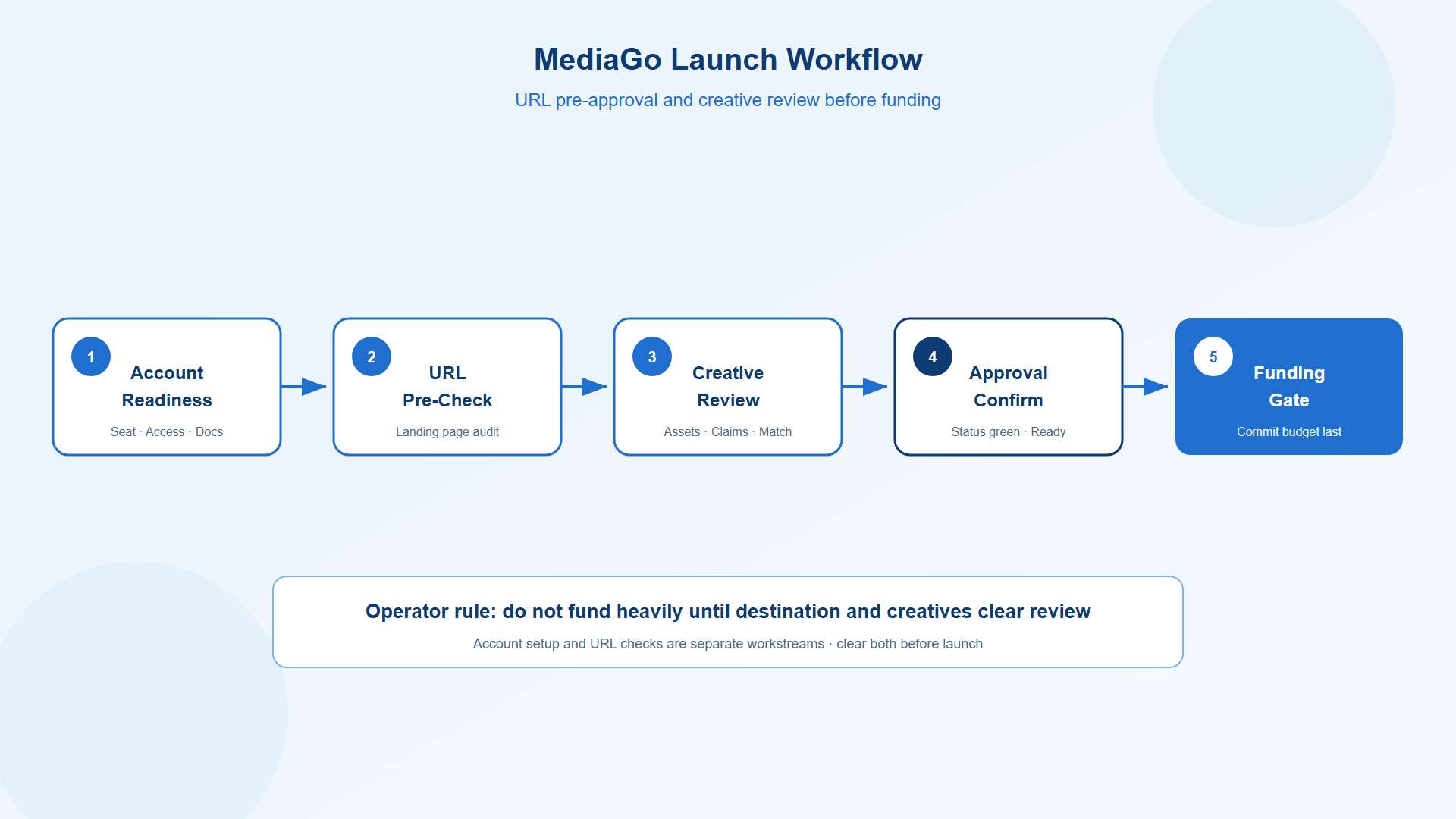
If your team is still preparing account access, start with Novabeyond's MediaGo ad account guide. Account setup and destination checks are separate workstreams, and both need attention before a campaign can launch smoothly.
MediaGo URL Pre-Approval Checklist
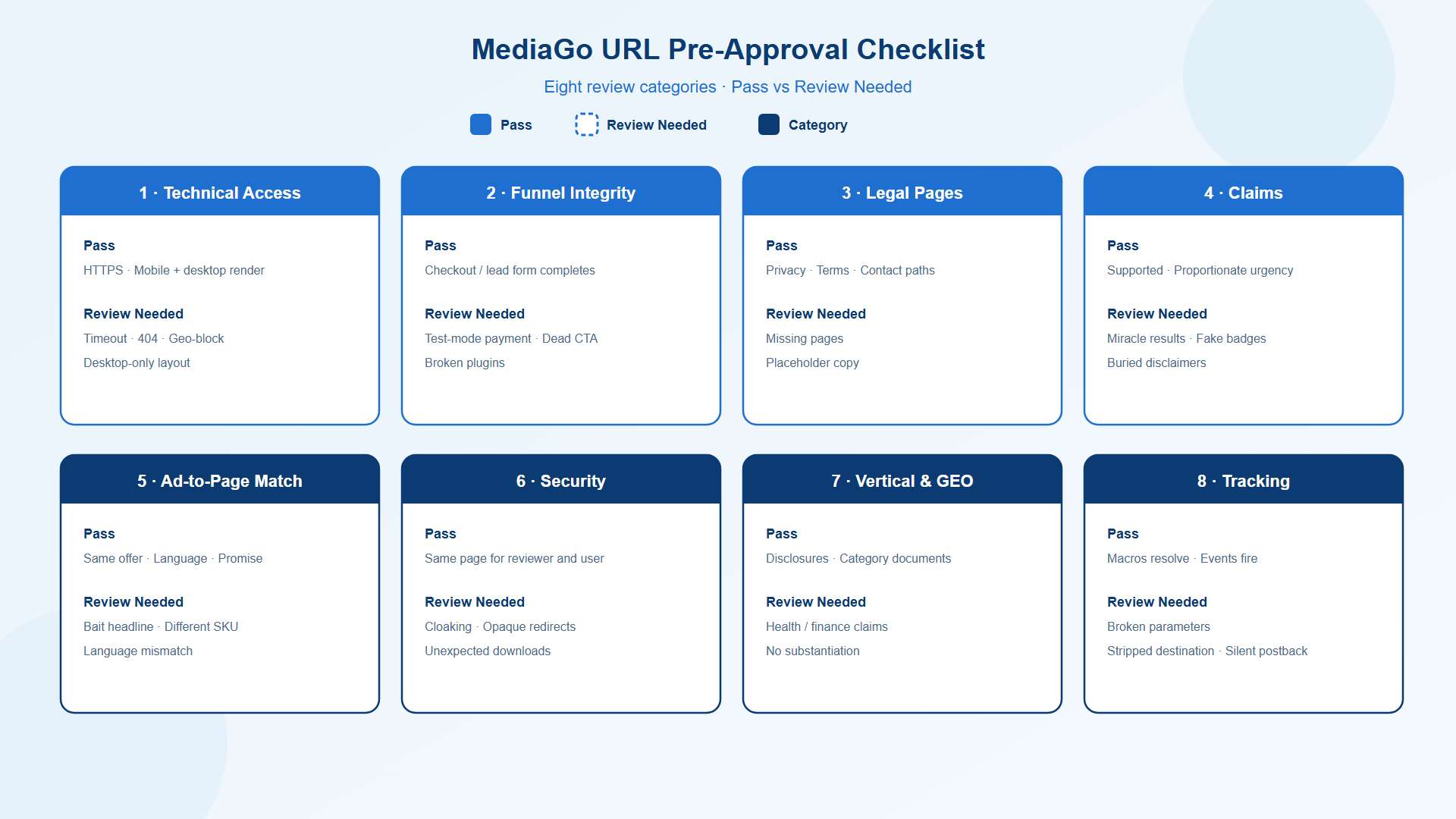
Run this checklist against the exact live URL you intend to submit. Test the final destination, not a staging page or an earlier version of the offer.
The checks below combine general landing page quality practices with security considerations MediaGo has published.
| Check area | Pass signal | Common fail signal |
| Technical access | HTTPS, page renders on mobile and desktop | Timeout, 404, geo-block, desktop-only layout |
| Funnel integrity | Checkout or lead form completes | Test-mode payment, dead CTA, broken plugins |
| Legal pages | Privacy, terms, and contact paths with real text | Missing pages, placeholder copy |
| Claims | Supported claims, proportionate urgency | Miracle results, fake badges, buried disclaimers |
| Ad-to-page match | Same offer, language, and promise | Bait headline, different SKU, language mismatch |
| Security | Same page for reviewers and users | Cloaking, opaque redirect chains, unexpected downloads |
| Vertical and GEO | Disclosures and documents for the category | Health or finance claims with no substantiation |
| Tracking | Macros resolve, conversion events fire | Broken parameters, stripped destination, silent postback |
Check Technical Access and Page Completeness
Open the final destination on mobile and desktop. Test it from a network and device configuration representative of the target market where practical.
Confirm that HTTPS works, the page renders correctly, and the primary content remains accessible without repeated errors. An HTTP 200 response can help verify that a request succeeded. It does not prove that the page is usable or ready for advertising.
Review navigation links, product pages, pricing modules, and important interactive elements. Remove placeholder text, unfinished sections, and broken menus. Check that currency selectors and localization features display the correct information for the intended GEO.
A destination that works only in your internal environment may behave differently for reviewers or users. Investigate unexpected access restrictions, geographic errors, and redirect behavior before submission.
Pre-submission actions:
Test the final URL on mobile and desktop.
Check key internal links and page resources.
Remove unfinished content and broken modules.
Confirm that the actual advertised offer is visible without unnecessary barriers.
Test Forms, Checkout, and Primary CTAs
A landing page should support the action promised by the advertisement. If the creative promotes a purchase, verify the purchase journey. If it promotes a consultation or lead form, test the complete submission process.
For ecommerce campaigns, check product selection, pricing, shipping information, checkout progression, and confirmation messages. Use an appropriate test environment or authorized test transaction without representing a test purchase as a real sale.
For lead generation, submit a test lead and verify that the form validates correctly, produces a clear confirmation, and reaches the intended CRM or lead management system.
Review pop-ups, overlays, and other interactive elements. They should not obstruct the advertised offer, trap users, or trigger unexpected downloads.
Pre-submission actions:
Test the primary CTA from the initial click through completion.
Confirm that forms and payment integrations behave as intended.
Check confirmation messages and lead routing.
Remove unnecessary interruptions and deceptive interface patterns.
Review Legal Pages and Business Transparency
Build a clear, trustworthy destination that explains who provides the product or service and what the user can expect.
Depending on the business model, market, and applicable rules, relevant information may include a privacy policy, terms, contact details, refund conditions, shipping information, and company identification. Check the requirements that apply to your offer and target GEO.
Make important information accessible through clear navigation. Replace placeholder addresses, inactive email links, and generic template text with accurate business details.
Native-style advertorials deserve particular attention. If the page presents promotional content in an editorial format, use appropriate advertising disclosures so users can understand the commercial nature of the material.
Pre-submission actions:
Publish accurate and accessible policy pages where they apply.
Verify contact details and company information.
Make pricing and relevant purchase conditions clear.
Review advertorial disclosures and other required notices.
Validate Claims, Testimonials, and Disclosures
Claims that sound compelling in an advertisement can create compliance risks when the landing page cannot substantiate them.
Review absolute promises, unusually high performance claims, health outcomes, investment returns, testimonials, and countdown timers. Remove fabricated endorsements, unauthorized logos, misleading scarcity messages, and statements that imply guaranteed results without adequate support.
Health, supplements, finance, and other regulated categories may require additional review. Requirements depend on the product, jurisdiction, audience, and platform rules. Check those requirements before submission rather than relying on a generic disclaimer.
Where claims need qualifications, place the relevant explanation close to the claim. A disclaimer buried at the bottom of a long page may not adequately explain a prominent promise.
Pre-submission actions:
Match claims to evidence that the business can substantiate.
Verify that testimonials are authentic and appropriately presented.
Remove misleading urgency and unsupported guarantees.
Confirm the applicable disclosures, licenses, or certificates for the offer and GEO.
Match the Advertisement to the Final Destination
The advertisement and landing page should communicate the same offer. Review the headline, creative, product, pricing, language, and intended market as one package.
For example, an advertisement promoting a specific product should not lead users to an unrelated product category. A localized campaign should not send users to a page that omits the relevant language, currency, or regional offer details.
Check every destination variation used across ad groups. Separate GEO-specific pages may be more appropriate when pricing, availability, claims, or legal requirements differ between markets.
Tracking parameters should not change the intended destination or remove essential information. MediaGo's URL parameter tracking documentation explains how its tracking parameters support reporting and server-to-server postback workflows.
Pre-submission actions:
Match the final URL to the advertised product and promise.
Verify language, currency, and availability for the target GEO.
Test every destination variation used in the campaign.
Confirm that tracking parameters resolve correctly and preserve the intended offer.
Check Security, Redirects, and Destination Stability
Security problems can affect both review outcomes and user trust. MediaGo's public security materials specifically address threats such as malicious advertising and cloaking.
Cloaking means presenting materially different content to reviewers and users to evade checks. Do not use a simplified page for review and then switch to a different, misleading offer after approval.
Redirects require context. Legitimate redirects and tracking flows may form part of a normal campaign setup, so their presence alone is not proof of a policy violation. Investigate unnecessary redirect chains, unexpected domain changes, and behavior that obscures the final destination.
Keep the approved offer stable after review. Material changes to claims, products, or destination behavior may warrant another compliance check and can introduce new review risks.
Pre-submission actions:
Confirm that users reach the intended destination.
Remove suspicious or unnecessary redirects.
Verify that page content does not change deceptively by visitor type.
Document major page changes and review them before further delivery.
Confirm Vertical and GEO Requirements
Different industries and markets can introduce different advertising restrictions. Health products, supplements, financial services, and similar categories may require additional documentation, qualifications, disclosures, or audience controls.
Start by classifying the offer accurately. Then identify the requirements that apply to the product and target GEO. Avoid labeling a specialized or regulated offer as general ecommerce simply to simplify the setup.
For campaigns spanning several markets, maintain separate records for localized claims, pricing, legal information, and relevant qualifications. A single global landing page may not provide the information every market needs.
Pre-submission actions:
Confirm the offer category and target GEO.
Review applicable platform and local requirements.
Prepare supporting documents where required.
Keep market-specific landing pages and disclosures aligned with their advertisements.
Verify Tracking Parameters and Conversion Measurement
A destination can load correctly while its measurement setup remains broken. Treat tracking as a separate technical check rather than assuming URL approval confirms attribution.
MediaGo's URL parameter tracking documentation provides a reference for UTM fields, tracking_id=${TRACKING_ID}, and server-to-server postback workflows.
Use the documentation to verify the parameters and tracking method relevant to your campaign.
Pre-submission actions:
Test the final URL with its actual tracking parameters.
Confirm that dynamic macros resolve as expected.
Validate the conversion journey and event delivery.
Investigate attribution errors before interpreting campaign performance.
Passing these checks reduces avoidable technical problems and gives your team a clearer starting point for review.
Once the destination and campaign are ready, consult Novabeyond's BIGO Ads vs MediaGo ROI guide for further channel planning.
How to Fix a MediaGo Landing Page Rejection and Resubmit
When MediaGo rejects a destination, start with the written review remark. Identify the affected layer before making changes. A missing policy page requires a different fix from a failed checkout or a tracking error.
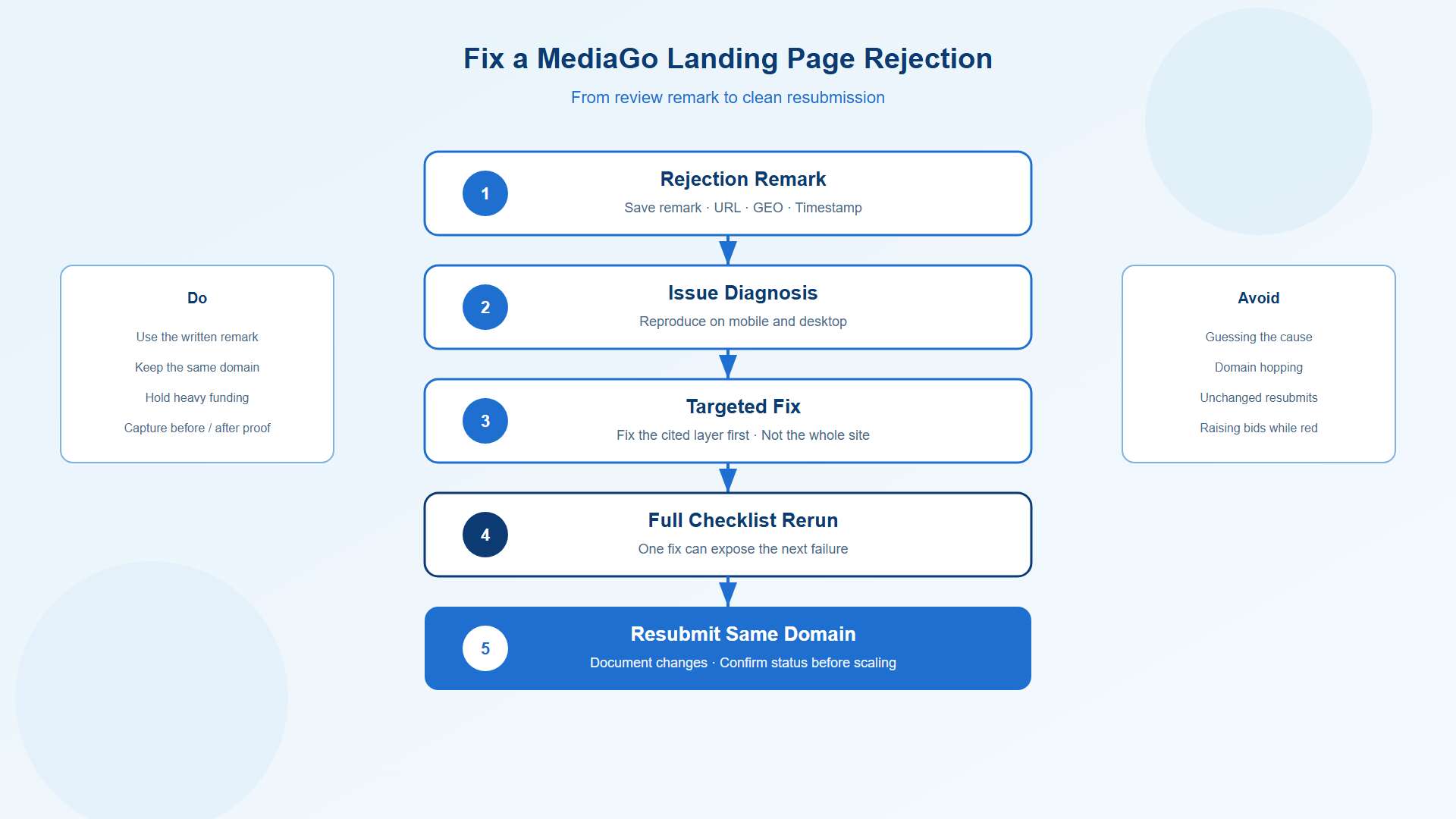
Follow this six-step process.
Record the rejection. Save the review remark, submitted URL, target GEO, timestamp, and relevant campaign details.
Reproduce the issue. Open the same destination on mobile and desktop. Check whether the reported problem appears in the relevant environment.
Fix the cited issue first. Update the technical setup, page content, disclosures, offer consistency, or other area identified in the remark.
Repeat the full checklist. A targeted fix can reveal another problem. Recheck the complete destination before resubmission.
Document the changes. Keep before-and-after screenshots, the revised URL, and a short record of what changed. Resubmit through the appropriate platform workflow.
Review status before scaling. Confirm the destination's review status and check for any remaining creative or account restrictions before committing substantial budget.
Using the same domain after a correction keeps a cleaner audit trail. If a review remark specifies a different process, follow the platform's instructions.
If the destination is approved but the campaign still receives no impressions, move to a delivery diagnosis rather than repeatedly resubmitting the URL. Novabeyond's MediaGo ads not delivering checklist covers the next stage, including approval status, targeting, bidding, tracking, and runtime checks.
Prepare your MediaGo agency ad account for launch
Pre-Fund Operating Rhythm for Agency Ad Accounts
Teams managing multiple campaigns can reduce avoidable review delays by making destination QA part of their agency ad account workflow.
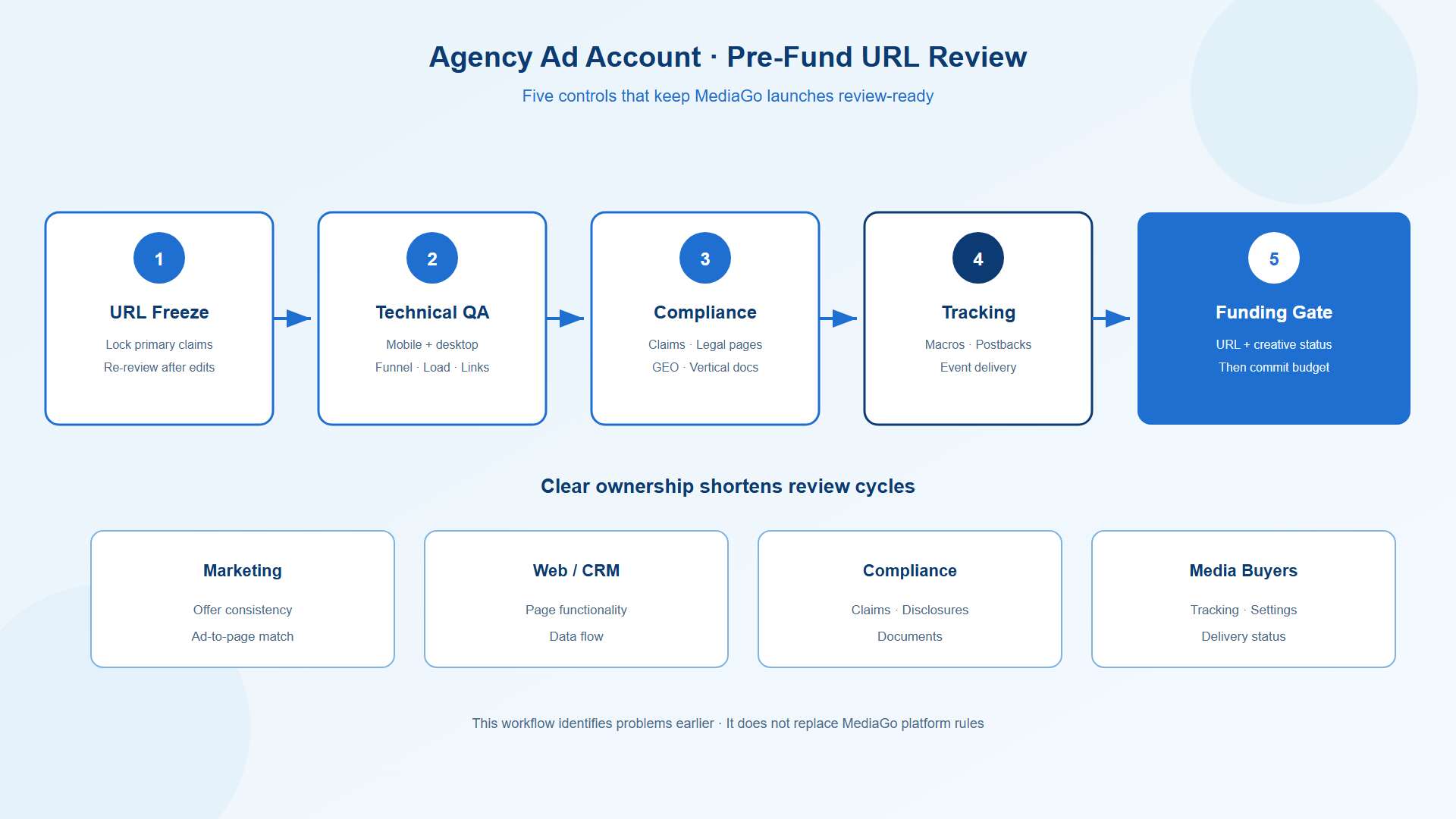
A simple operating process should include five controls.
URL freeze date: Set a clear point after which material changes to the offer or primary claims require another review.
Dual-device evidence: Capture mobile and desktop screenshots of the tested destination.
Compliance record: Store relevant disclosures, supporting documents, and market-specific requirements with the URL record.
Clear ownership: Assign responsibility for page fixes, legal copy, tracking, payment integrations, and campaign status.
Funding gate: Check destination and creative status before committing substantial launch or scaling budget.
A clear responsibility map can further shorten review cycles. Marketing owns offer consistency. Web or CRM teams handle page functionality and data flow. Compliance reviews claims and applicable documentation. Media buyers validate tracking, campaign settings, and delivery status.
This workflow helps teams identify problems earlier and respond to review remarks with less confusion.
After destination approval, use Novabeyond's Display and Native MediaGo growth formula to explore campaign planning and growth opportunities across these formats.
FAQ
1. What is MediaGo URL pre-approval?
MediaGo URL pre-approval refers to reviewing a destination before a campaign uses it for paid traffic. The practical checks include page accessibility, offer consistency, content quality, security, and any applicable platform requirements. Confirm the exact review process through your account's available platform guidance.
2. Why was my MediaGo landing page rejected if my creative looks fine?
Creative review and destination review evaluate different parts of the campaign. A strong creative cannot compensate for an inaccessible page, broken user journey, misleading claims, or an issue identified in the destination review. Start with the written rejection remark and investigate the specific layer it identifies.
3. oes URL approval guarantee that my ads will spend?
No. Destination approval does not guarantee impressions, clicks, or conversions. Creative status, targeting eligibility, bids, budget, campaign configuration, tracking, and auction conditions can also affect delivery. If the URL is approved but spending remains at zero, investigate the campaign's delivery status.
4. Can I change the landing page after MediaGo approves the URL?
You can maintain and update your website, but material changes to the advertised offer, claims, or destination behavior can introduce new review risks. Review significant changes before relying on an earlier approval. Never use cloaking or deceptive content swaps to show reviewers a different offer from the one users receive.
5. What documents help regulated offers prepare for review?
Depending on the product, GEO, and applicable rules, you may need substantiation for claims, licenses, certificates, disclaimers, or other supporting information. Confirm the specific requirements for your category instead of assuming one document package applies to every health, supplement, or financial offer.
6. Should I fund my MediaGo account before URL pre-approval completes?
Complete the destination checks and confirm the relevant approval status before committing substantial launch or scaling budget. Funding an account does not resolve a rejected destination. Your exact funding sequence should also account for account setup requirements and the platform's current procedures.
7. How is URL pre-approval different from a MediaGo zero-traffic problem?
URL pre-approval focuses on destination readiness before or during review. A zero-traffic diagnosis addresses why an eligible campaign is not delivering as expected, including approval status, targeting, bidding, configuration, tracking, and runtime. Use the MediaGo zero-traffic delivery checklist when the campaign has moved beyond destination preparation but delivery remains stalled.
8. Can tracking parameters or redirects affect MediaGo URL review?
They can introduce technical problems if they produce malformed URLs, unexpected destinations, or confusing redirect behavior. However, legitimate tracking parameters and normal redirects are not automatically policy violations. Test the complete URL, confirm that macros resolve correctly, and ensure the final destination remains consistent with the advertisement. Refer to MediaGo's URL parameter tracking documentation for supported tracking workflows.
Conclusion
MediaGo URL pre-approval deserves a place in every campaign's launch process. Check technical access, funnel functionality, legal transparency, claims, offer consistency, security, vertical requirements, and tracking before submitting the final destination.
When a review fails, use the written remark to identify the issue, make a targeted correction, repeat the full checklist, and document the resubmission. Confirm the relevant status before committing substantial budget or interpreting delivery performance.
Novabeyond supports Emerging Media Solutions teams with MediaGo agency ad account preparation, destination pre-checks, tracking validation, and launch workflows. By addressing avoidable problems before launch, your team can spend less time troubleshooting preventable issues and more time building a reliable foundation for campaign growth.
more posts
Beyond the Duopoly: The 2027 Guide to Alternative Traffic Sources and Emerging Media Solutions
October. 26 2026
LEARN MORE

Taboola Agency Ad Account Setup: Access, Funding & Compliance
October. 16 2026
LEARN MORE
Moloco Ads Optimization: Surviving the Learning Phase and Scaling iROAS (2026)
October. 08 2026
LEARN MORE
Kwai Ads vs. SnackVideo Ads: 2026 Allocation Matrix for LATAM & Southeast Asia
September. 28 2026
LEARN MORE