




UNIT 616 6/F KAM TEEM INDUSTRIAL BUILDING 135 CONNAUGHT ROAD WEST SAI WAN HONGKONG.
Copyright © 2026 NOVABEYOND LIMITED (company number 2833487). All rights reserved.
Introduction
A TikTok ad rejection can disrupt a launch just when your team is ready to scale. The creative has passed internal review, the campaign budget is approved, and your media buyers are waiting for delivery. Then TikTok Ads Manager displays Disapproved, delaying impressions, testing, and performance optimization.The challenge is that a rejection does not always point to an obvious creative problem. Your video may comply with advertising policies while the landing page contains a pricing mismatch, missing disclosure, or restricted product. A campaign that works in one market may also fail review in another because local advertising requirements differ.TikTok reviews ads against its Advertising Policies, Community Guidelines, and applicable market-specific requirements. Most ad reviews take around 24 hours, according to TikTok's Ad Review FAQs, although some take longer.The fastest response starts with diagnosis, not guesswork. Instead of repeatedly changing creatives or submitting appeals without evidence, identify the exact rejection reason, fix the affected component, and follow the correct review process. This guide explains seven common TikTok Ads rejection categories, shows how to address each one, and outlines a practical workflow for resubmission, appeals, and prevention.
Ask Novabeyond to pre-check your TikTok creative and landing page
Quick Answer
If your TikTok Ads are rejected, open TikTok Ads Manager and review the rejection details under the Campaign tab. Identify whether the problem involves the creative, landing page, product category, targeting market, or technical setup. Fix the specific issue before resubmitting. Saving an edit to the ad creative typically triggers a new review, which may take around 24 hours. A landing-page-only change does not automatically trigger re-review, so follow TikTok's guidance or contact Advertiser Support when necessary. Appeal only when you believe the decision is incorrect and can support your case with relevant policy references, screenshots, licenses, or other documentation.
How TikTok Ad Review Works and How to Diagnose Rejections
TikTok evaluates advertising content before delivery. Depending on the campaign, the review can involve the video, captions, audio, destination URL, landing-page content, product category, and targeting settings.An ad rejection does not necessarily mean the entire account has been suspended. Understanding the scope of the issue helps your team avoid unnecessary changes and recover delivery more efficiently.
Read the rejection reason before editing
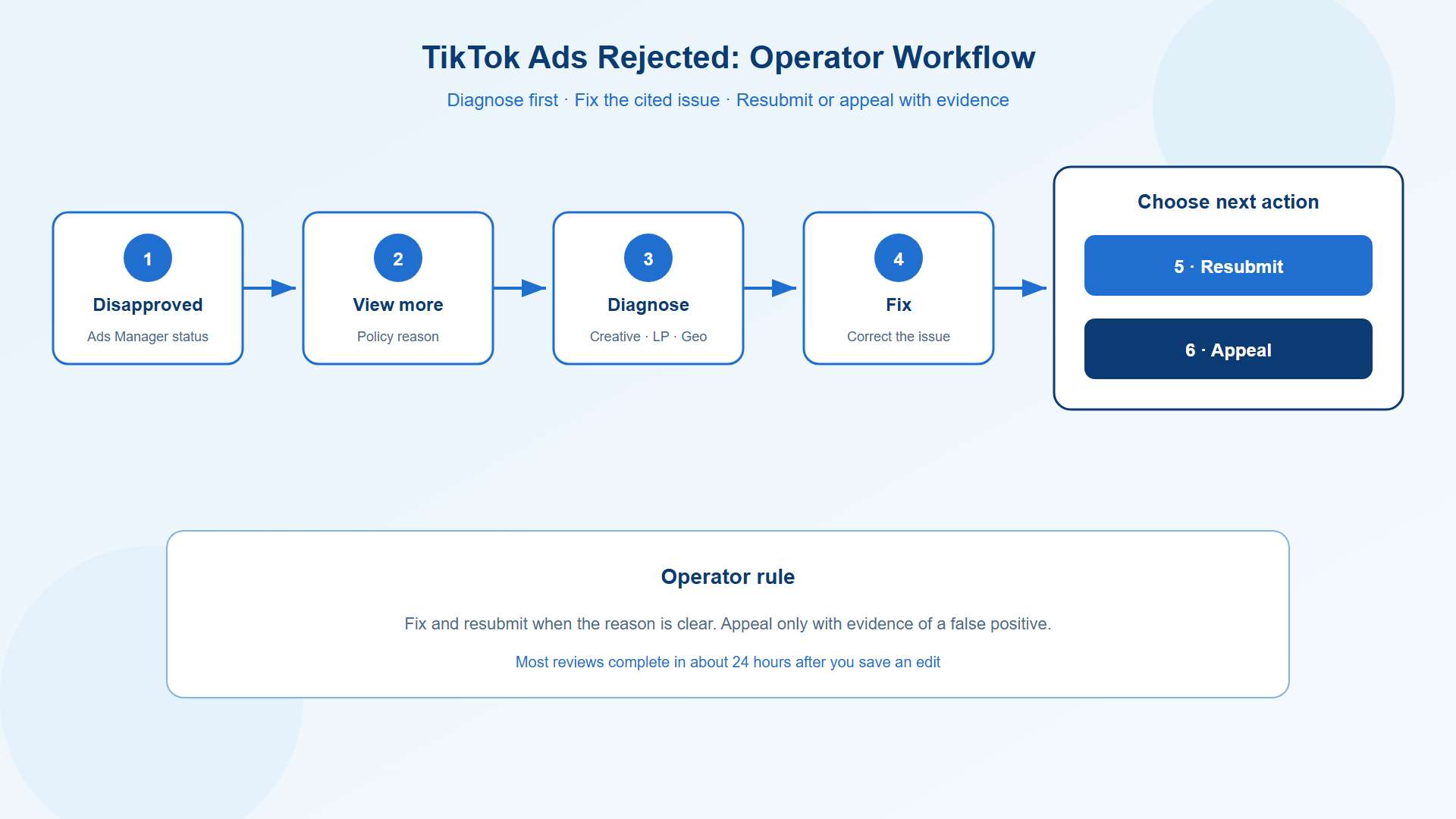
TikTok's official guide, What to do if your ad or ad group was rejected, provides a starting point for diagnosing the issue. Follow this workflow:
Open TikTok Ads Manager and navigate to the Campaign tab.
Locate the rejected ad or ad group.
Click the Disapproved status.
Open View more to review the available explanation and suggested corrective actions.
Identify the affected asset, policy category, or campaign setting.
Make the necessary correction and follow the available resubmission instructions.
Do not rewrite the entire creative before understanding the rejection. If the actual issue is an inaccurate discount claim or a broken landing page, changing the video hook will not solve the underlying problem.Record the rejection reason and the action taken. This creates a useful history for future launches and helps your team identify recurring compliance issues.
Distinguish ad rejection from broader account restrictions
Not every delivery problem has the same cause.Use the actual status and explanation shown in Ads Manager rather than assuming that every restriction follows the same procedure.Repeated policy violations can create additional operational risk, particularly when they involve prohibited products, misleading claims, or recurring landing-page problems. However, do not assume that every rejected ad automatically triggers an account-level penalty.Once the rejection is resolved, creative performance becomes the next priority. Novabeyond's guide to why TikTok Ads live or die by creative explores the creative factors that influence campaign results after approval.
7 Common TikTok Policy Violations and How to Fix Them
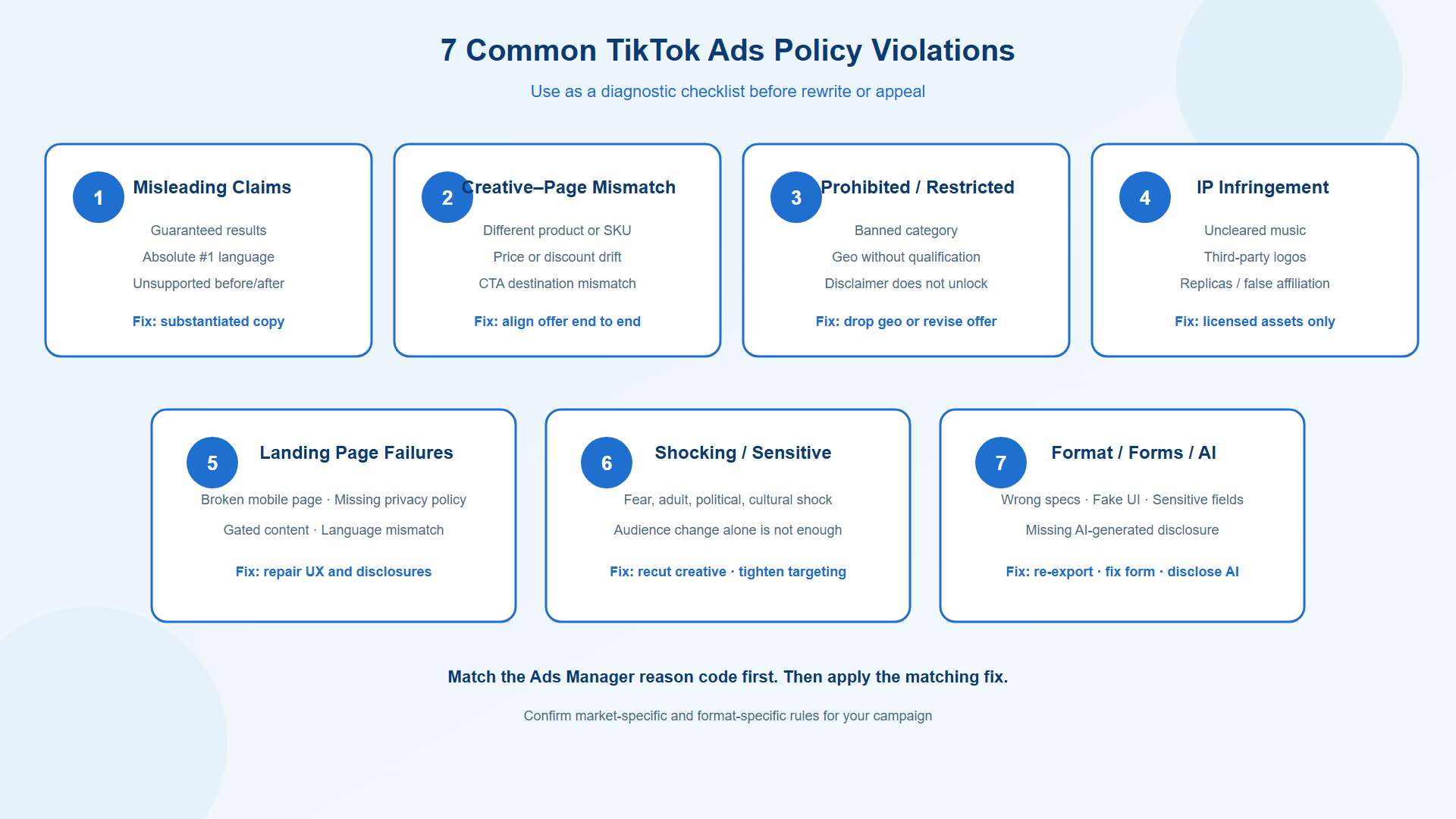
The following categories cover common rejection triggers described in TikTok's common ad rejection reasons, misleading and false content policy, and Ad Format and Functionality policy.Use them as a diagnostic checklist, then confirm the specific requirements that apply to your product, market, and ad format.
Misleading or exaggerated claims
TikTok requires advertising claims to comply with its applicable policies. Unsupported performance promises, misleading comparisons, exaggerated benefits, and claims that create unrealistic expectations can trigger rejection.For example, a campaign may promise guaranteed financial returns or dramatic results within a fixed period without adequate substantiation. Even when a claim reflects a genuine customer experience, the advertiser must ensure that the wording and presentation comply with the rules for that product category.
How to fix it:
Replace absolute promises with specific, supportable statements.
Remove claims such as "guaranteed results" unless the claim is both substantiated and permitted.
Verify that testimonials, statistics, and performance comparisons have appropriate evidence.
Review voice-over, captions, overlays, and visual demonstrations together.
Avoid fake interface elements that suggest a function the ad does not provide.
Keep the message persuasive without promising outcomes your business cannot substantiate.
Inconsistency between the ad and landing page
A creative can look compliant and still fail review when its destination tells a different story.Common examples include advertising one product while the landing page features another, promoting a discount that is unavailable, or displaying a price in the creative that does not match the destination.These inconsistencies can damage both compliance and conversion performance.
How to fix it:
Match the advertised product, brand, SKU, and offer to the landing page.
Verify discount depth, eligibility conditions, and promotion dates.
Ensure that the CTA leads to the relevant product or service.
Check that prices and currencies match the targeted market.
Review every localized creative against its corresponding destination.
Treat the landing page as part of the advertising asset. A compliant video cannot compensate for an inaccurate or misleading destination.
Prohibited or restricted products and industries
TikTok does not permit every product category in every market. Some products are prohibited, while others may be eligible only under specific conditions, including geographic restrictions, age requirements, advertiser qualifications, or additional documentation.A disclaimer alone does not make an otherwise prohibited product eligible.
How to fix it:
Check TikTok's industry-specific policies before creating the campaign.
Confirm eligibility separately for each targeted market.
Obtain required licenses, certifications, or other documentation where applicable.
Remove ineligible markets or revise the offer when necessary.
Check the entire landing page, not just the creative, for restricted products or claims.
For cross-border campaigns, avoid assuming that approval in one country establishes eligibility everywhere else.
Intellectual property infringement
Unauthorized use of trademarks, logos, copyrighted material, music, and other protected assets can cause rejection. Product replicas or content that falsely implies an official brand relationship can also create problems.Music deserves particular attention. Audio that is available for personal or organic use is not automatically cleared for commercial advertising.
How to fix it:
Use audio that is approved for the intended commercial use or obtain the necessary licenses.
Remove third-party logos and copyrighted materials when you lack authorization.
Keep written permissions and licensing documents organized.
Verify creator authorization before running eligible Spark Ads.
Submit relevant proof of authorization through the applicable TikTok process when requested.
Treat music rights, trademark permissions, copyright licenses, and creator authorization as separate checks. One document may not cover every asset in a campaign.
Landing-page functionality, privacy, and mobile failures
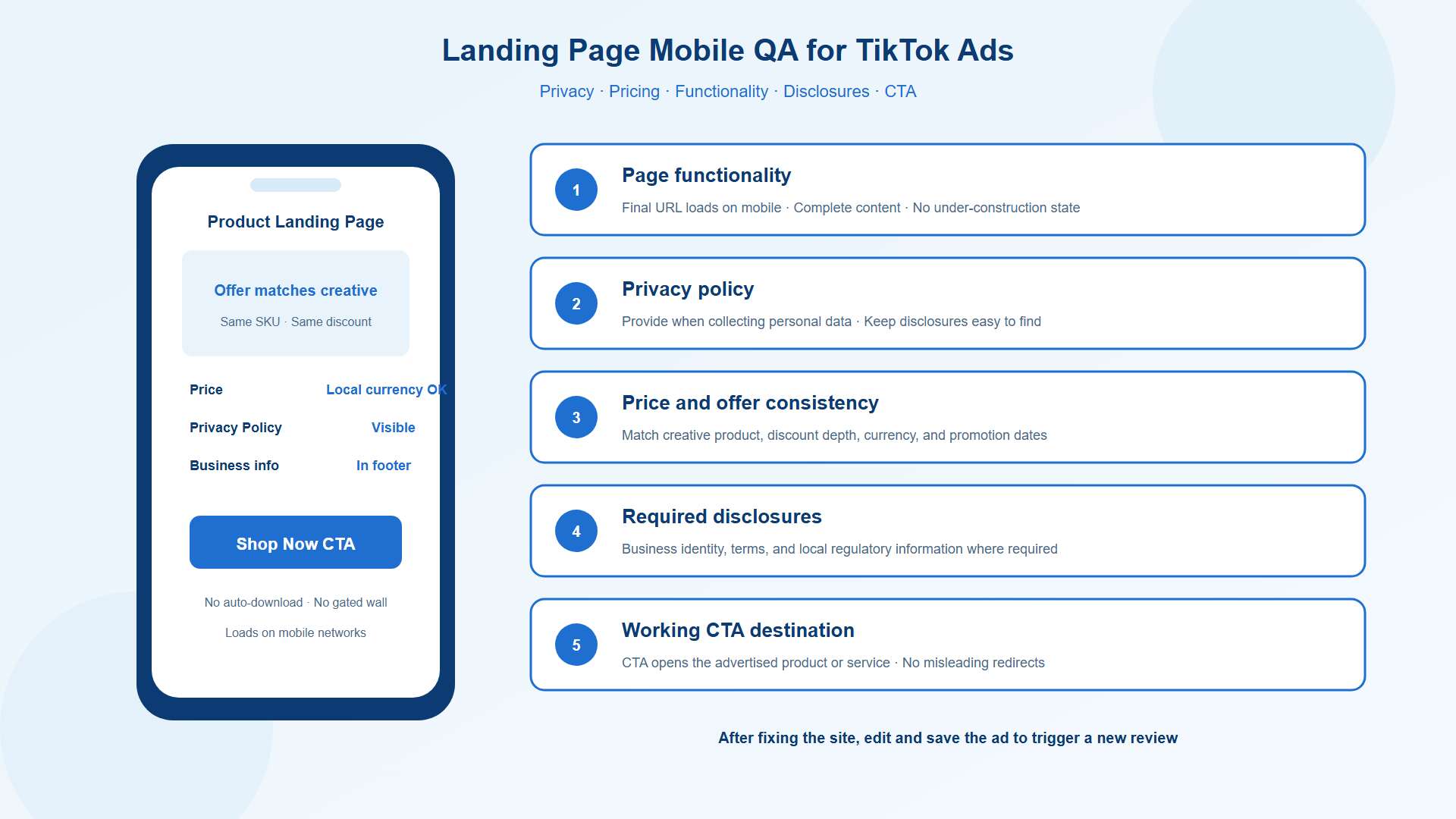
TikTok evaluates the destination as part of the advertising experience. A broken page, incomplete content, misleading redirect, or inaccessible mobile layout can undermine an otherwise compliant ad.Privacy and disclosure requirements also matter when a landing page collects personal information or promotes a regulated product.How to fix it:
Test the final destination URL on mobile devices and networks.
Confirm that the page loads correctly and displays complete content.
Check that the advertised offer remains available and matches the creative.
Make relevant business information, terms, and required disclosures accessible.
Provide a privacy policy when applicable, particularly when collecting personal data.
Remove unexpected downloads, misleading redirects, and unnecessary barriers to the main content.
Verify that the language and currency suit the intended market.
Important: Fixing the website alone does not automatically reopen the ad for review. After correcting the destination, follow TikTok's current instructions for requesting a new review, which may involve editing and saving the ad or contacting Advertiser Support.
Sensational, shocking, or sensitive content
Creative that relies on graphic imagery, excessive shock, sexual provocation, or other restricted material may violate TikTok's applicable content policies. Sensitive subjects can also require additional care depending on the product, audience, and market.A strong opening hook does not need to depend on fear or shock.
How to fix it:
Review the opening frames, thumbnails, captions, and audio.
Remove graphic or unnecessarily provocative elements that conflict with applicable policies.
Present product benefits accurately rather than relying on fear-based exaggeration.
Verify age and geographic targeting requirements for eligible sensitive categories.
Review local rules before using culturally or socially sensitive material in cross-border campaigns.
Do not assume that changing the audience alone makes restricted content acceptable. The creative and product category must also meet the applicable requirements.
Format, functionality, and lead-form failures
Some rejections result from technical specifications rather than the substance of the advertising message.Possible triggers include unsupported video specifications, non-functional interactive elements, lead forms that request prohibited or sensitive information, or missing disclosures where TikTok requires them.Video requirements can vary by market and ad format. The general duration guidance in TikTok's review materials should not be treated as a universal specification for every placement.
How to fix it:
Check the current specifications for your selected ad format and market.
Export video in the required dimensions, duration, and file format.
Verify that sound, captions, and interactive elements function as intended.
Remove fake tap or swipe interfaces that do not perform the advertised action.
Review lead-form fields against TikTok's applicable data collection rules.
Apply required AI-generated content disclosures when the content and policy call for them.
Separate campaigns by market when local requirements differ.
If only one market rejects a campaign, investigate its specific rules before replacing every creative across all markets.
Quick reference: rejection reasons and fixes
Violation | Typical trigger | Fix before resubmit |
Misleading claims | Guaranteed results, absolute claims, unsupported before/after | Soften copy; keep only substantiated claims |
Creative-page mismatch | Different product, price, or discount versus the site | Align SKU, price, promo, and CTA URL |
Prohibited / restricted | Banned category or geo without qualification | Drop the geo, change the offer, or submit credentials |
IP infringement | Uncleared music, logos, replicas | Swap licensed assets; upload authorization |
Landing page failures | Broken mobile page, missing privacy policy, gated content | Repair UX; add disclosures; match language |
Shocking / sensitive | Fear, adult, political, or cultural shock hooks | Recut creative; tighten age and geos |
Format / forms / AI | Wrong specs, fake UI, sensitive lead fields, missing AI label | Re-export; fix the form; disclose AI where required |
Get a TikTok policy pre-flight with Novabeyond operators
Fix, Resubmit, or Appeal: The Operator Workflow
The right recovery method depends on the rejection reason and the options TikTok provides for your ad or account.
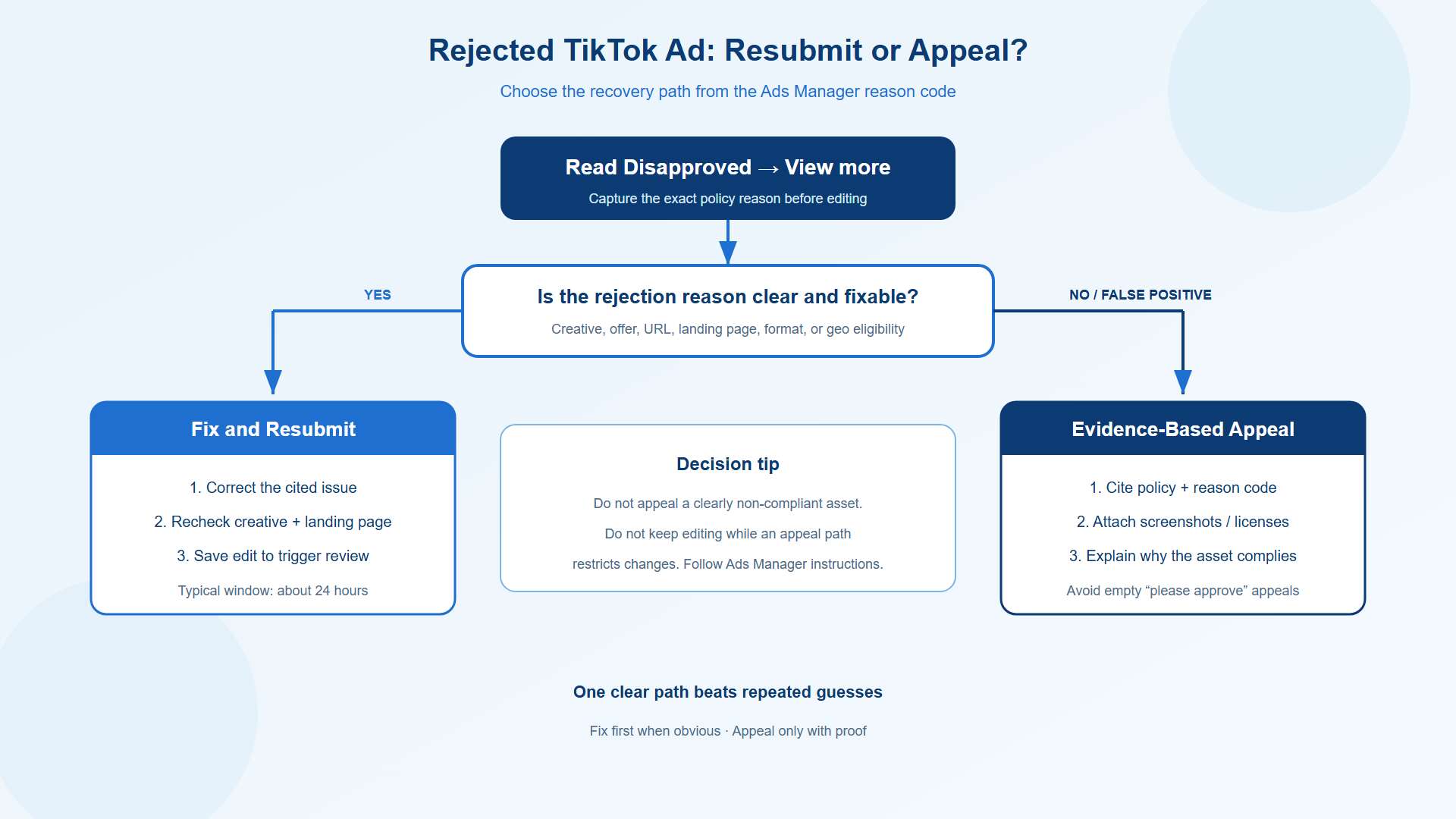
Fix and resubmit when the issue is clear
When the rejection identifies a specific creative, offer, URL, or technical problem, correct that issue first.Review the updated asset against the original rejection reason. Check the landing page and supporting materials as well as the video. Then follow the available instructions in Ads Manager to submit the corrected ad for review.TikTok states that most ad reviews take around 24 hours, although some take longer. Treat that as a general expectation, not a guaranteed turnaround time.
Appeal when you have evidence of an incorrect decision
An appeal may be appropriate when your asset complies with the cited policy, the reviewer appears to have misunderstood the content, or relevant authorization and certification documents support your case.Prepare a concise explanation that includes:
The rejection reason and relevant policy.
The specific part of the ad or landing page in question.
Screenshots showing the relevant content.
Valid licenses, certifications, or authorization documents where applicable.
A clear explanation of why the asset meets the requirement.
Use the appeal path available in Ads Manager and follow the instructions for your account and ad type. TikTok's One Click Appeal guide explains additional considerations for supported appeal workflows.Some appeal processes restrict editing while a case is pending and may trigger review of the wider ad group. Check the applicable instructions before submitting, and avoid repeated appeals that do not add relevant evidence.
Keep platform-specific recovery processes separate
A TikTok ad rejection is not the same as an account suspension on another advertising platform. Each platform has its own review and enforcement process.If your team also manages Google Ads account issues, use Novabeyond's dedicated Google Ads Manager Account suspension appeal guide for that separate workflow. For TikTok, follow the rejection notice and the relevant options in Ads Manager.
Prevention Checklist for High-Volume and Cross-Border Buyers
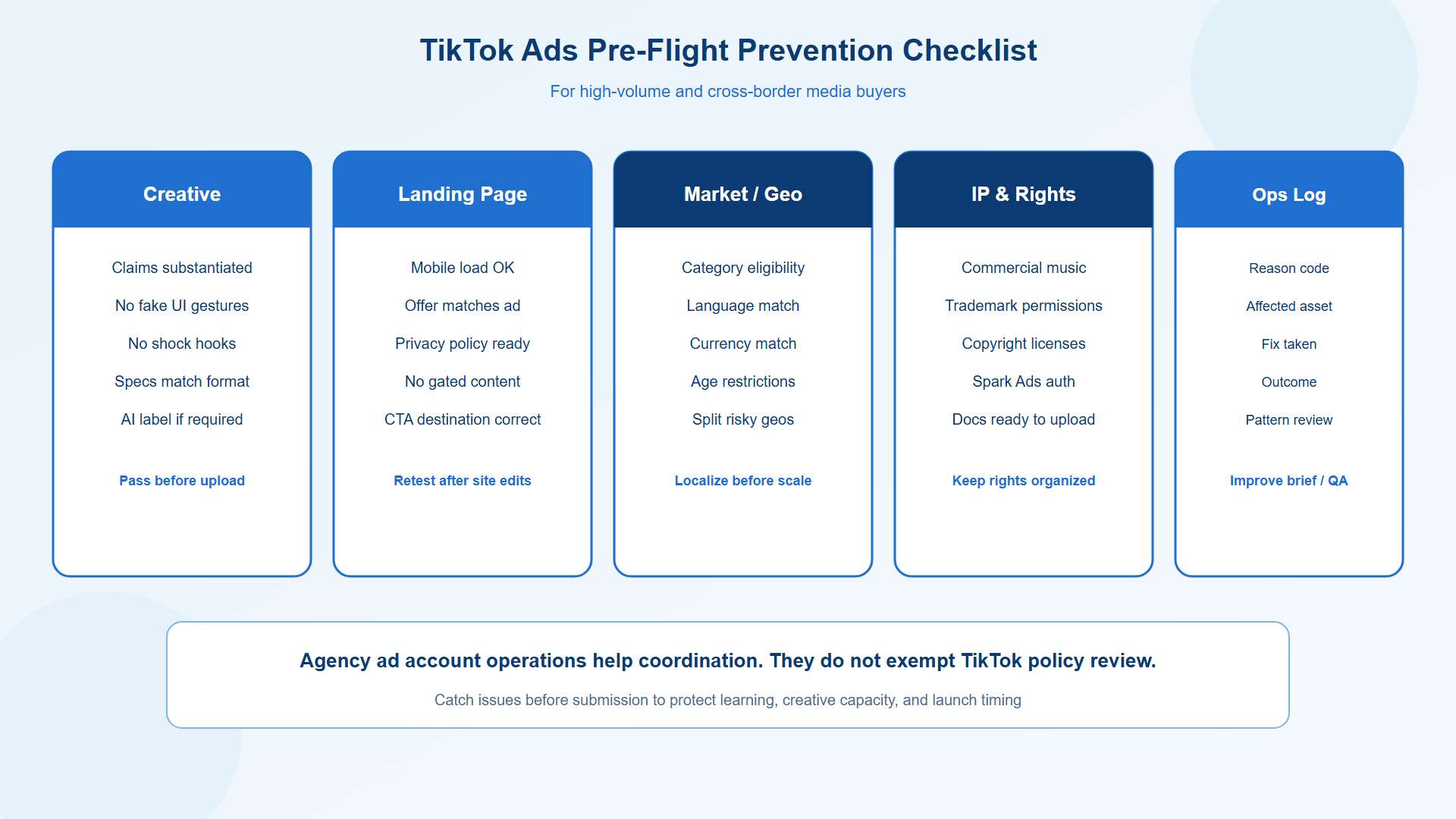
Repeated rejection consumes more than media budget. It delays testing, creates unnecessary production work, and makes campaign planning less predictable.A structured pre-launch process helps teams catch common issues before submission.
Build a pre-flight checklist. Verify the final URL, offer, product claims, licenses, and relevant market requirements.
Localize by market. Check currency, language, disclosures, product eligibility, and age requirements for each destination.
Maintain claim substantiation. Store evidence for performance claims, comparisons, testimonials, and promotional statements.
Review creative and landing pages together. Check that the product, price, offer, and CTA remain consistent.
Keep rights documentation organized. Track commercial music licenses, intellectual property permissions, and creator authorizations.
Retest landing pages after changes. Confirm that site updates have not introduced broken links, unavailable offers, or compliance issues.
Maintain clear agency ad account operations. Use appropriate access controls, documentation, and escalation procedures to support coordinated campaign management. An agency ad account does not exempt advertising from TikTok policies or guarantee approval.
Log every rejection. Record the reason, affected asset, corrective action, and outcome. Recurring patterns reveal where your briefing or QA process needs improvement.
FAQ
1. Why was my TikTok ad rejected even though the video looks compliant?
TikTok's review may cover the full advertising experience, including the caption, audio, destination URL, landing-page content, product category, and targeting market. A compliant video can still fail if the destination contains an inconsistent offer, a broken page, or restricted content.
2. How long does TikTok ad review take after I fix a rejection?
TikTok states that most ads are reviewed within around 24 hours, although some reviews take longer. The actual timing depends on the case. Check Ads Manager for the current status rather than assuming that every resubmission follows the same schedule.
3. Should I appeal or edit when TikTok Ads are rejected?
Edit and resubmit when the rejection identifies a clear, correctable issue. Appeal when you believe the decision is incorrect and can provide relevant evidence. Follow the appeal options available for your ad type and account.
4. Can a disclaimer make a prohibited product allowed on TikTok Ads?
No. A disclaimer does not override a product prohibition. Some categories may be eligible under specific market, age, or qualification requirements, but advertisers must verify those conditions before launching.
5. Why did only some countries reject my TikTok ad group?
Advertising requirements can differ by market. Product eligibility, language, age restrictions, required disclosures, and local rules may affect approval. Review the rejection reason for each market and separate campaigns when different requirements call for different creatives or landing pages.
6. Does fixing my website automatically trigger a new ad review?
No. A landing-page-only change does not automatically trigger a new review. After repairing the destination, follow TikTok's current instructions to request another review, which may involve editing and saving the ad or contacting Advertiser Support.
7. Can repeated TikTok ad rejections hurt my entire ad account?
A single rejection does not necessarily mean an account-level restriction. However, repeated policy violations can increase operational risk and may lead to broader enforcement depending on the circumstances. Fix recurring problems rather than repeatedly submitting substantially unchanged assets.
8. What evidence should I include in a TikTok Ads appeal?
Start with the rejection notice and the relevant policy. Provide screenshots of the creative and landing page, plus valid licenses, certifications, or authorization documents when relevant. Explain why the asset complies with the cited requirement, and follow the submission instructions available in Ads Manager.
Conclusion
TikTok Ads rejections usually point to a specific issue that your team can investigate: misleading claims, creative and landing-page inconsistencies, restricted products, intellectual property problems, destination failures, sensitive content, or technical errors.The most effective response is systematic. Read the rejection details, identify the affected component, correct the underlying issue, and follow the appropriate resubmission or appeal process. Build those checks into your launch workflow so that recurring mistakes do not keep delaying campaign delivery.Novabeyond helps performance teams approach advertising operations with greater structure through creative and landing-page pre-checks, cross-border policy awareness, and organized agency ad account operations. With a clearer compliance process, your team can spend less time troubleshooting preventable rejections and more time improving the campaigns that drive growth.
Talk to Novabeyond about TikTok Ads compliance and launch support
more posts
Google Ads Suspended in 2026? How to Appeal and Unblock Your Manager Account
September. 20 2026
LEARN MORE

Swiftproxy Review 2026: Exploring Its Residential Proxy Features and Performance
July. 17 2026
LEARN MORE
Verified Agency Ad Account Provider | Stable Ad Accounts 2026
May. 25 2026
LEARN MORE
2026 Agency Advertising Account Leasing Service: A Guide
May. 20 2026
LEARN MORE