




UNIT 616 6/F KAM TEEM INDUSTRIAL BUILDING 135 CONNAUGHT ROAD WEST SAI WAN HONGKONG.
Copyright © 2026 NOVABEYOND LIMITED (company number 2833487). All rights reserved.
Introduction
Your BIGO Ads campaign can be ready to launch and still fail to spend. The creative passes internal review, conversion tracking is configured, and your target GEOs are selected. Then the Business Center review stalls, a bank transfer cannot be matched, or your team discovers that the account was created with the wrong currency.
These problems often start before the first impression. For cross-border advertisers, account access, business verification, funding procedures, and campaign configuration all affect launch readiness. Confusing BIGO Live host-agency registration with BIGO Ads advertiser access can create another costly detour.
In 2026, growth teams evaluating BIGO Ads need to understand more than the registration process. They need a clear view of the Business Center structure, the role of an authorized advertising partner, the actual cost of getting started, and the tracking and optimization requirements that support profitable acquisition.
This guide explains how BIGO Ads agency ad accounts work, how to prepare for Business Center approval, which pricing questions to resolve before funding, and how to build a first campaign around measurable outcomes.
For a broader overview of agency access, read Novabeyond's BIGO Ads agency ad account overview. You can also consult the 2025 account opening requirements guide for additional background, while confirming that its requirements remain current.
Need help choosing your BIGO Ads access path?
Quick Answer
A BIGO Ads agency ad account gives advertisers a way to run campaigns through an authorized advertising partner. The operating structure typically includes a user login, a Business Center, and one or more ad accounts. BIGO's Business Center guide covers company verification and key settings, including timezone and currency selection. Authorized partners use the Agency Portal to manage eligible Business Centers, members, and balance allocation. Total costs can include media spend, funding-related expenses, and partner fees. Before depositing funds, confirm current platform requirements, review timelines, budget recommendations, commercial terms, and account ownership in writing.
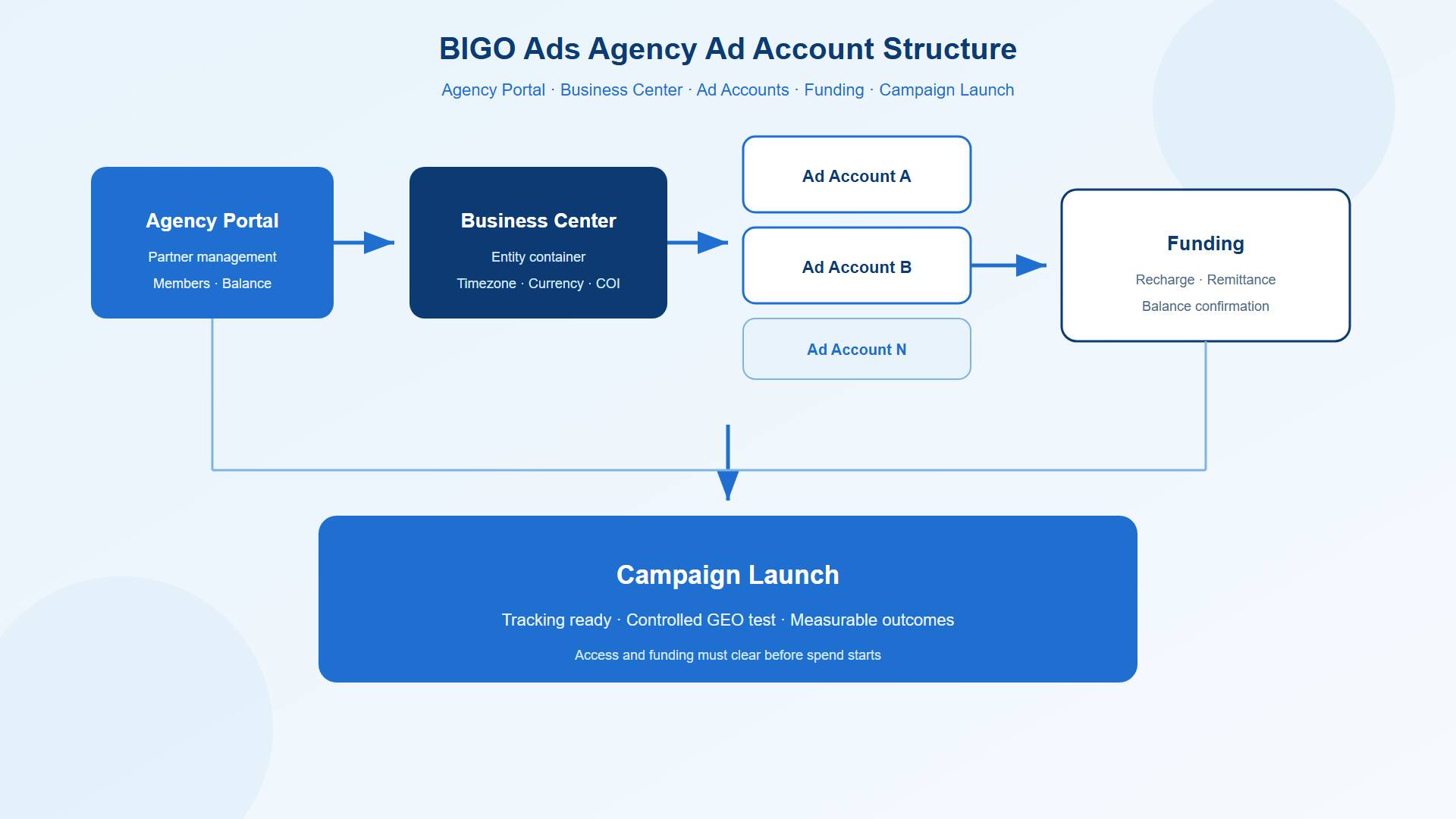
BIGO Ads Account Structure and Access Options
BIGO Ads Agency Ad Accounts vs. BIGO Live Agency Registration
One of the most important distinctions is the difference between BIGO Ads advertiser access and BIGO Live host-agency registration.
BIGO Live agency programs generally relate to host recruitment or creator operations. BIGO Ads serves advertisers who want to purchase media and measure campaign performance across supported advertising inventory, including placements associated with Likee, imo, and the BIGO Audience Network.
These are different operating paths. Registering as a BIGO Live agency does not, by itself, provide the Business Center and advertising capabilities needed to launch paid acquisition campaigns.
Before paying a registration fee or signing a service agreement, confirm that the offering explicitly covers BIGO Ads. Ask the provider which entity manages the Business Center, who controls the ad accounts, how funds are allocated, and which party handles policy reviews and campaign operations.
Business Center vs. Ad Account vs. Agency Portal
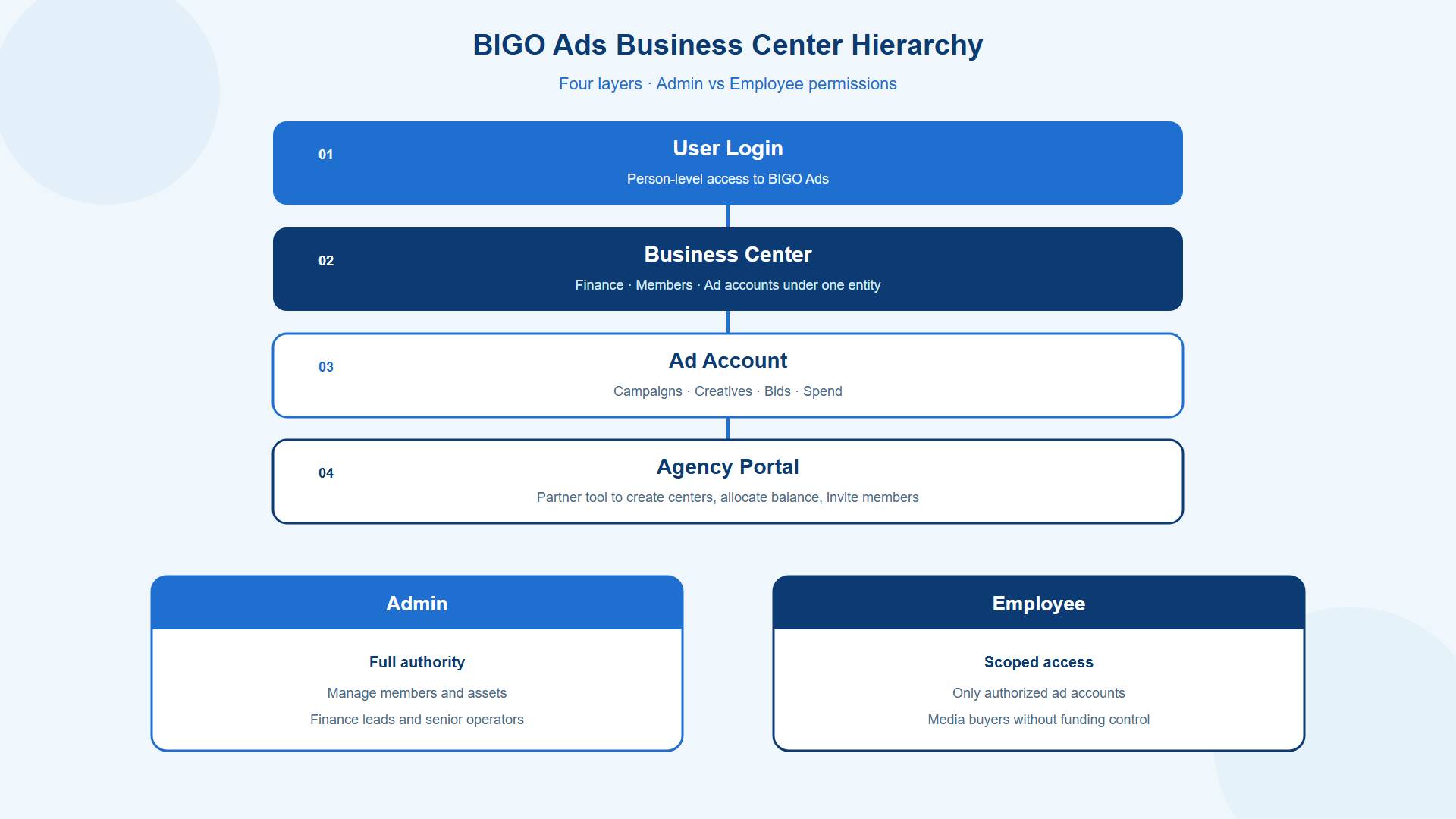
Understanding the account hierarchy helps marketing, finance, and operations teams assign responsibilities correctly.
| Layer | What it is | Why it matters |
| User login | Person-level access to BIGO Ads | Required before you create or join a Business Center |
| Business Center | Entity container for finance, members, and ad accounts | Timezone and currency are permanent; company name must match the COI |
| Ad account | Campaign container under the Business Center | Holds creatives, bids, and spend; can be scoped to operators |
| Agency Portal | Partner tool for Business Centers, balances, and members | Used by authorized agencies to create and fund centers |
BIGO's Agency Portal guide explains the relevant partner-side functions. Admins generally have broader asset and member management responsibilities, while Employees receive access according to their assigned permissions.
Use the principle of least privilege. Finance leads and senior operators should retain the permissions required to manage billing and assets. Media buyers should have access to the ad accounts they operate, without unnecessary control over funding or unrelated business entities.
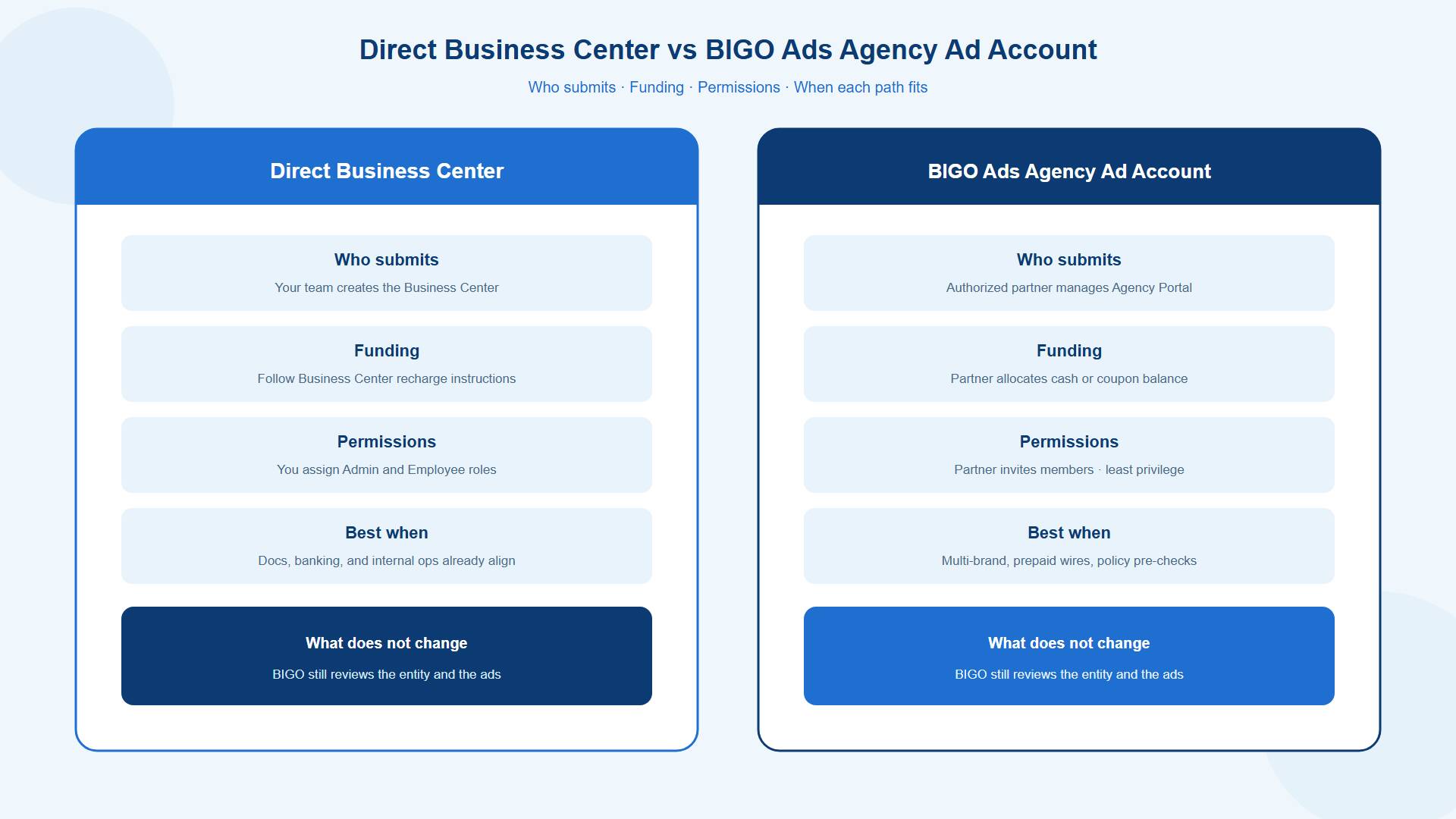
Should You Open a Business Center Directly or Use an Agency Ad Account?
Direct setup can suit advertisers with complete company documentation, compatible banking arrangements, and enough internal capacity to manage account operations.
An agency ad account may be more practical when a business needs:
Separate advertising structures for multiple brands or markets.
Help preparing company documents and checking submission requirements.
Support with prepaid funding, remittance references, and balance reconciliation.
Guidance on policy requirements for sensitive advertising categories.
Campaign setup, tracking implementation, and ongoing optimization support.
| Layer | What it is | Why it matters |
| User login | Person-level access to BIGO Ads | Required before you create or join a Business Center |
| Business Center | Entity container for finance, members, and ad accounts | Timezone and currency are permanent; company name must match the COI |
| Ad account | Campaign container under the Business Center | Holds creatives, bids, and spend; can be scoped to operators |
| Agency Portal | Partner tool for Business Centers, balances, and members | Used by authorized agencies to create and fund centers |
The right choice depends on your legal structure, market coverage, funding process, and internal resources. An agency can help organize these tasks. Platform approval and advertising policy still sit with BIGO.
Novabeyond's Emerging Media Solutions supports advertisers entering emerging media channels through account onboarding assistance, localized compliance preparation, and campaign execution.
Business Center Access Checklist
Before creating a Business Center, confirm the following:
Legal entity: Identify the company that will advertise and fund the account.
Company name: Match the Business Center information to the applicable Certificate of Incorporation (COI) or equivalent registration document.
Timezone and currency: Select settings that fit reporting and financial reconciliation. BIGO's documentation states that these settings cannot be changed after Business Center creation.
Banking details: Confirm the remitting account and required payment information.
Website and offer: Ensure the landing page accurately represents the advertised product or service.
User permissions: Assign Admin and Employee roles according to operational responsibilities.
Tracking ownership: Decide who configures App Events, pixels, MMP integrations, and postbacks.
GEO-specific requirements: Check any additional registration or reporting requirements for your target markets.
For a more detailed opening walkthrough, review Novabeyond's how to open a BIGO Ads account in 2026. Treat the page as a supporting resource and verify any time-sensitive instructions against the latest platform guidance.
BIGO Ads Pricing, Funding, and Budget Planning
What Does a BIGO Ads Agency Ad Account Cost?
There is no single universal price for agency access. Advertisers should separate platform media spend from partner service fees and funding-related costs.
BIGO's campaign setup guidance provides campaign configuration recommendations. Confirm the current budget requirements that apply to your objective and account before treating any published figure as a universal minimum.
For planning purposes, distinguish three numbers: the platform's minimum permitted budget, the budget needed to generate useful test volume, and the amount your finance team must authorize for the initial funding cycle. They serve different purposes.
Partner fees also vary by agreement. Do not assume that a quoted percentage, minimum monthly spend, or initial deposit applies to every advertiser. Request a written quotation that separates media spend, service fees, payment charges, and any applicable taxes.
How BIGO Ads Funding Works
The funding process can affect launch timing even after an account receives approval.
On the applicable Business Center funding path, advertisers may need to confirm funding instructions, transfer funds, provide the required remittance information, and upload payment evidence before the balance becomes available. The exact workflow depends on the account arrangement.
BIGO's Business Center documentation provides guidance on recharge procedures and payment references. Before transferring funds, verify the current instructions directly with the platform or your authorized partner.
Pay particular attention to these details:
The legal name associated with the remitting bank account.
The required payment reference or remittance remark.
The Business Center identifier and company information requested for reconciliation.
The method used to confirm that the transfer has arrived.
The expected processing time after receipt of funds.
The process for requesting invoices and reconciling balances.
Do not schedule a launch around an assumed crediting date. Processing time may depend on bank settlement, the completeness of payment information, and the applicable finance workflow.
Seven Questions to Ask Before Your First Deposit
What is the minimum initial deposit for this specific account arrangement?
Does the agreement require a minimum monthly spend?
Are funds allocated as cash, coupons, or a combination of both?
What exact remittance reference must appear on the transfer?
Who confirms receipt and verifies the available advertising balance?
What happens to unused funds if campaigns stop or the agreement ends?
Which party can change Business Center balances, and who approves those changes?
Document the answers before transferring money. This reduces reconciliation disputes and gives marketing and finance teams a shared understanding of their responsibilities.
Recognize Risky Account Offers
Be cautious when a provider promises guaranteed approval, unrestricted GEO access, or account access that supposedly avoids platform review. Advertising policies and verification requirements still apply.
Also clarify whether the arrangement gives your business authorized operating access or depends on an account transfer with unclear ownership. Account provenance, permissions, billing responsibility, and unused balances should all be transparent.
The objective is not simply to obtain the cheapest access. It is to establish a compliant operating structure with predictable funding procedures and enough support to keep campaigns running.
Planning your first BIGO Ads deposit?
BIGO Ads Setup, Tracking, and Campaign Optimization
Step 1: Prepare Your Business Documents
Prepare a document pack before submitting your Business Center application.
Depending on the account and advertiser category, this may include:
A valid COI or equivalent business registration document.
Company details that match the submitted legal documentation.
A corporate website or product landing page that reflects the advertised offer.
Authorized representative and business contact information.
Additional qualifications for regulated or sensitive advertising categories, where required.
Sample creatives and a concise description of the product or service.
Review the website, creative claims, and business documents together. A company may have valid registration documents but still encounter advertising review issues if the landing page does not clearly explain the offer or conflicts with the creative.
Novabeyond's agency-assisted opening guide provides another reference for preparing an application. Partner-side pre-checks can help identify gaps before submission. Final account and advertising approval still sit with the platform.
Step 2: Create the Business Center and Confirm Its Settings
Before submitting the application, check the legal entity, company name, timezone, currency, and contact information.
Timezone and currency deserve particular attention because BIGO's documentation states that they cannot be changed after Business Center creation. A wrong choice can complicate reporting, reconciliation, and communication between local teams and finance.
Once the Business Center is approved, plan the ad account structure around real operational needs. Separate brands or markets when they require distinct budgets, reporting, permissions, or compliance workflows. Avoid creating unnecessary accounts without a clear reason.
Review the applicable BIGO Ads Business Center guide before proceeding.
Step 3: Complete Funding and Reconciliation
Follow the funding instructions associated with your account. Confirm the recipient details, legal entity, required remittance reference, and supporting payment records before sending money.
After the transfer, verify that the funds have been credited and that the available balance matches the expected amount. Reconcile any difference before launching campaigns.
Build funding time into your launch plan. A campaign should not depend on a same-day transfer unless the account's available balance has already been confirmed.
Step 4: Validate Tracking Before Increasing Spend
Tracking quality determines whether your team can evaluate campaign performance reliably.
For app acquisition, configure the required App Events and confirm the MMP or server-to-server (S2S) integration. Test the event flow and check that the platform receives the intended conversion signals.
For web campaigns, install and validate the relevant pixel or conversion tracking setup. Check event firing, attribution settings, and the consistency of conversion definitions across analytics tools.
Assign clear ownership for each component. Your media buyer should know who can edit tracking objects, who monitors postbacks, and who investigates discrepancies between platform-reported and internal results.
Do not judge a campaign solely on clicks or installs if the business objective is paid conversion or revenue. Tracking should support the outcome your team actually needs to improve.
Step 5: Build a Controlled First Campaign
BIGO's campaign setup guidance offers recommendations for campaign and ad-group structure. Use those recommendations as a starting point, then adjust the plan to fit your budget, objective, and available conversion volume.
A disciplined first test should include:
One clearly defined objective. Choose an app event or web conversion that aligns with the business goal.
A controlled GEO structure. Separate markets when performance differences or reporting needs justify it.
Sufficient budget for learning. Set budgets based on current platform requirements and the expected cost of the selected conversion event.
A manageable creative set. Test meaningful differences in messaging, format, or value proposition rather than flooding the account with near-identical variations.
Stable measurement. Confirm attribution and event reporting before comparing performance.
A planned review window. Avoid frequent bid, targeting, and budget changes that make results difficult to interpret.
A campaign structure that works for one app or GEO may not work for another. Treat platform recommendations as operating guidance, not as a guarantee of delivery or profitability.
Step 6: Optimize Around Acquisition Quality and ROI
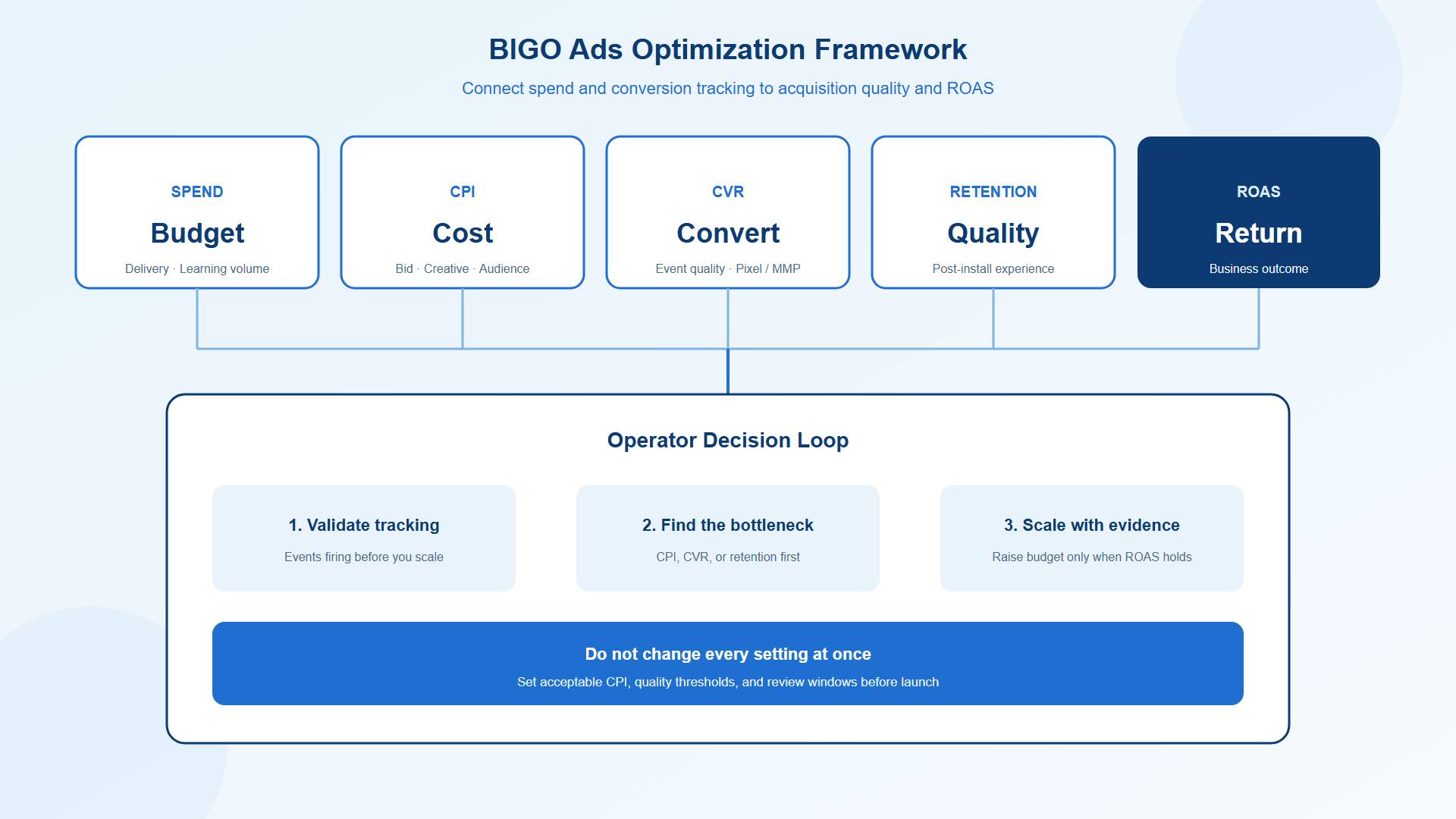
After launch, evaluate the campaign through a measurement framework that connects media delivery to business outcomes.
Start by checking whether tracking works and whether delivery is sufficient to support a meaningful decision. Then identify the largest constraint instead of changing every campaign setting at once.
If CPI is high, review the relationship between creative, audience, bid, and conversion event. If installs arrive but retention or purchase rates remain weak, examine user quality and the post-install experience. If reported ROAS differs substantially from internal analytics, investigate attribution windows, event definitions, and data latency before reallocating budget.
Scale only when results support the next investment. Set acceptable acquisition costs, minimum quality thresholds, and review intervals before launch. This gives the team a consistent basis for increasing budgets, pausing weak segments, and testing new creative directions.
Common BIGO Ads Setup Problems
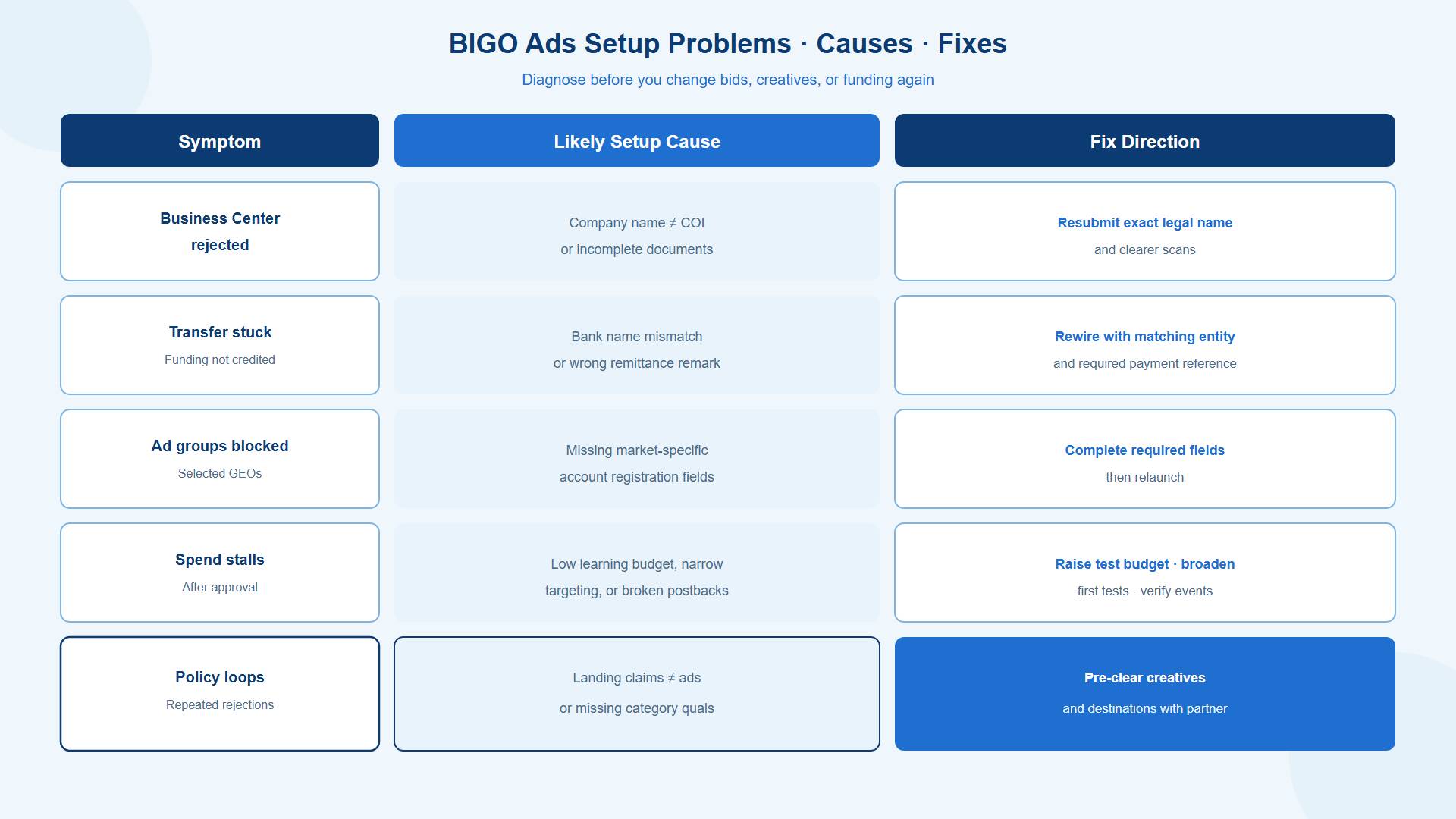
Treat these symptoms as diagnostic clues rather than proof of a single cause. Check the account status, platform guidance, tracking, and funding records before deciding on a fix.
| Symptom | Likely setup cause | Fix direction |
| Business Center rejected | Company name does not match the COI, or documents are incomplete | Resubmit with the exact legal name and clearer scans |
| Transfer stuck | Remitting bank name does not match the Business Center, or the payment reference is wrong | Rewire with matching entity details and the required remittance remark |
| Ad groups blocked in selected GEOs | Missing market-specific account fields | Complete required registration information before relaunch |
| Spend stalls after approval | Budget below learning needs, targeting too narrow, or broken postbacks | Raise test budgets, broaden first tests, and verify conversion events |
| Repeated policy loops | Landing-page claims do not match ads, or a sensitive category lacks qualifications | Pre-clear creatives and destinations with your partner |
FAQ
1. Is a BIGO Ads agency ad account the same as a BIGO Live agency?
No. BIGO Live agency registration generally relates to host or creator operations. A BIGO Ads agency ad account supports paid advertising through the advertiser account structure. Confirm that a provider explicitly offers BIGO Ads access before signing an agreement.
2. How long does BIGO Ads Business Center approval take?
BIGO's Business Center guidance has cited approximately three working days for review in normal circumstances. Treat this as an indicative timeframe, not a guarantee. Incomplete documentation, additional verification, or other account-specific requirements can extend the process. Check current guidance before setting a launch date.
3. What documents are needed to open a BIGO Ads Business Center?
Requirements depend on the advertiser and account arrangement. Common items include a COI or equivalent registration document, matching company information, business contact details, and a relevant website or landing page. Sensitive categories may require additional qualifications. Confirm the exact checklist before submission.
4. How much does a BIGO Ads agency ad account cost?
There is no single universal agency-access price. Total costs may include media spend, agency fees, payment charges, foreign exchange, and applicable taxes. Minimum deposits and monthly spending commitments depend on the arrangement. Obtain a written quotation and confirm the current platform budget requirements before funding.
5. Can I change the Business Center timezone or currency later?
BIGO's documentation states that timezone and currency cannot be changed after Business Center creation. Select both carefully based on financial reporting and operational requirements before submitting the application.
6. Who should have Admin access in the Agency Portal?
Limit Admin permissions to people who need to manage members and assets. Give media buyers the account access required for their campaigns, and restrict funding permissions to authorized finance or operations personnel. Review access periodically as team responsibilities change.
7. What should I do after funding my BIGO Ads account?
Confirm the available balance, test conversion tracking, check campaign eligibility, and launch a controlled initial test. Monitor delivery, acquisition costs, and downstream conversion quality. Increase spend only when measurement is reliable and results justify additional investment.
Conclusion
Successful BIGO Ads campaigns begin with a sound operating structure. The right Business Center settings, accurate company documentation, clear funding procedures, and well-managed permissions help reduce avoidable delays before launch.
Once the account is ready, tracking quality and disciplined campaign testing become the foundation for growth. Monitor acquisition costs alongside retention, qualified conversions, and ROAS. Use the resulting data to decide where to improve creative, adjust targeting, or allocate more budget.
Novabeyond helps advertisers navigate emerging media channels through account onboarding support, localized compliance preparation, and hands-on campaign execution. If your team is preparing to enter BIGO Ads, bring your target GEOs, business documents, funding requirements, and performance goals to the first discussion.
more posts
Ramadan Early Warm-Up: A December Action Checklist for Growth Teams Targeting the Middle East
November. 25 2026
LEARN MORE

Category × Platform: Three Questions to Find Your First Emerging Media Test
November. 19 2026
LEARN MORE
When to Use Kwai Ads vs SnackVideo Ads: Geography, Creative, and Budget Rules for 2027
November. 18 2026
LEARN MORE
The 7 Days After the Big Sale: Why December Is the Golden Window to Test Emerging Media
November. 16 2026
LEARN MORE